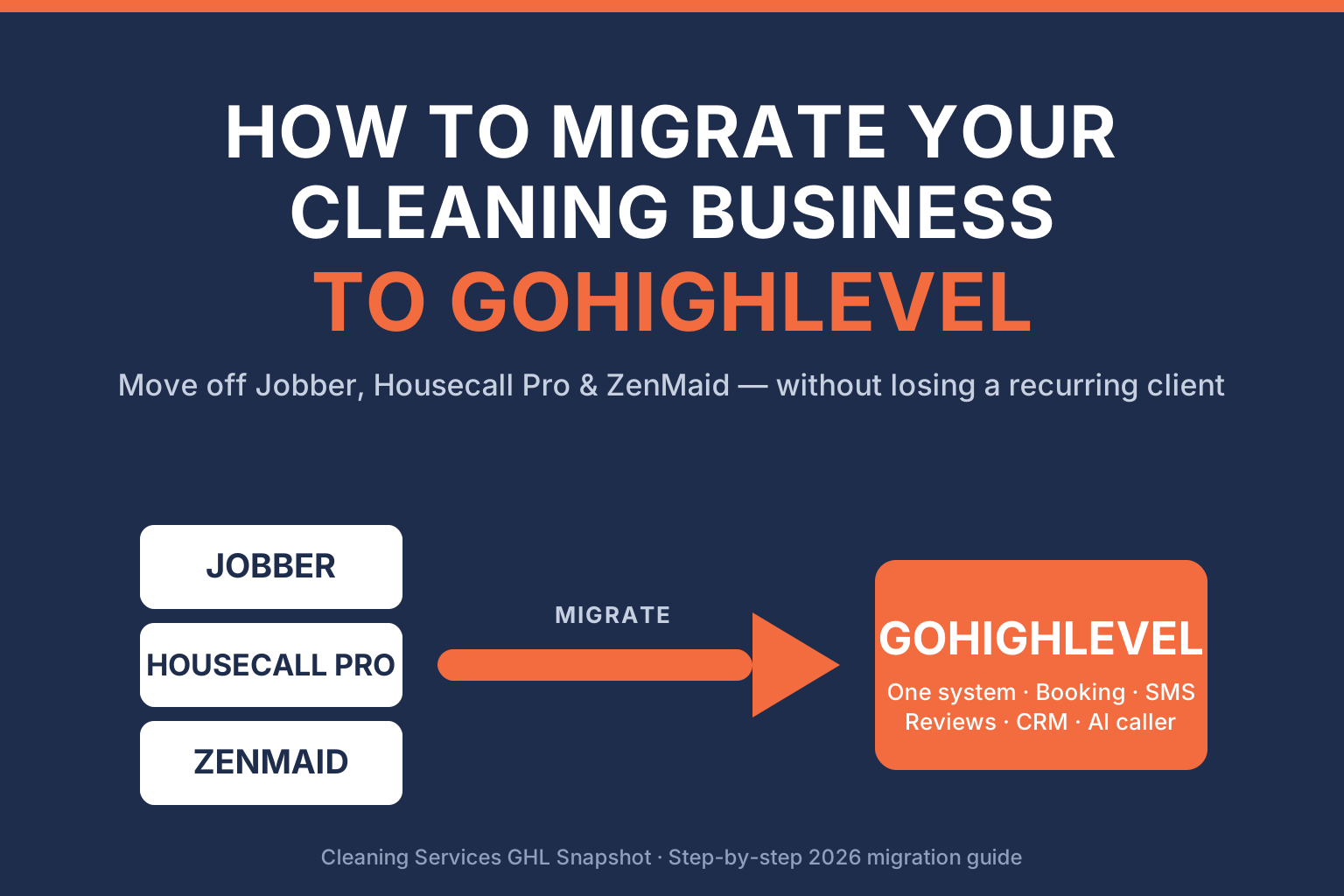
To migrate your cleaning business to GoHighLevel, work in seven ordered stages: audit and export your data from your current tool, map every field to GHL, import contacts and properties, rebuild your recurring cleaning plans, wire up your booking and follow-up automations, test the whole thing against real data, then cut over and monitor for two weeks. Done in that order, you move off Jobber, Housecall Pro, ZenMaid, or Launch27 without losing a standing appointment or a recurring client — and you land on a platform that runs your quoting, booking, reminders, reviews, and CRM in one system instead of five. This guide walks each stage the way a cleaning-niche GHL developer actually runs it.
This is written for US cleaning operators — residential maid services, commercial crews, and Airbnb-turnover teams — who’ve outgrown a single-purpose field-service app and want GoHighLevel to run the whole front office. Every statistic below is sourced; nothing is invented. Let’s move your business over the right way.
Key Takeaways
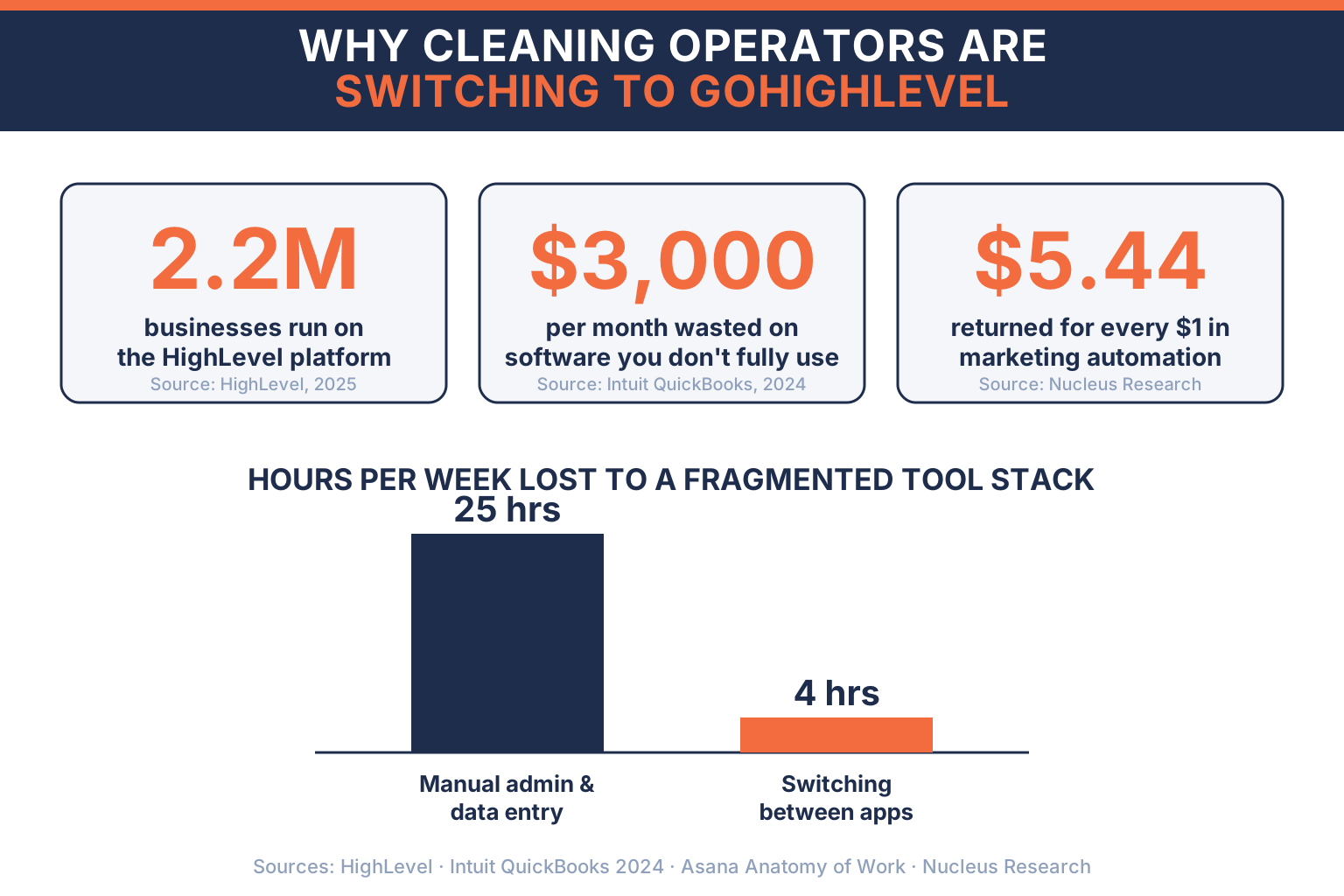
- Consolidation is the whole point. GoHighLevel now powers 2.2 million businesses and has facilitated 6.9 billion leads (HighLevel) precisely because it replaces the stack of single-purpose tools most operators juggle. SMBs overspend roughly $3,000/month on software they don’t fully use (Intuit QuickBooks 2024 Business Solutions Survey).
- A bad migration is a data problem, not a software problem. 76% of organizations say less than half their CRM data is accurate and complete, and 37% have lost revenue as a direct result of poor CRM data (Validity, State of CRM Data Management 2025). Clean your data before you import it.
- Do it in order. Audit & export → map → import → rebuild recurring plans → wire automations → test on real data → cut over. Skipping the mapping and test stages is what loses standing appointments.
- The payoff is speed and ROI. Marketing automation returns $5.44 for every $1 spent (Nucleus Research) — but only once your workflows are live in the new system.
- You don’t have to run the cutover alone. A cleaning-niche GHL development team migrates customers, recurring schedules, and history intact and rebuilds your booking flows as native GHL automations.
Table of contents
- Why cleaning businesses are moving to GoHighLevel
- What actually breaks in a bad migration
- Before you migrate: the pre-flight checklist
- How to migrate to GoHighLevel: the 7-step process
- What moves across from Jobber, Housecall Pro & ZenMaid
- DIY migration vs. done-for-you: the honest comparison
- After cutover: the automations that make the switch pay off
- Frequently asked questions
Why cleaning businesses are moving to GoHighLevel
Most cleaning operators don’t start on one platform. They accrete a stack: a scheduling app for jobs, a separate texting tool for reminders, a form builder for quotes, a review-request service, an email tool, and a spreadsheet holding the truth. Each one made sense the month you bought it. Together, they’re a tax you pay every week.
The data on that tax is blunt. The Intuit QuickBooks 2024 Business Solutions Survey found small businesses lose an average of 25 hours a week to manual data entry and reconciling information across disconnected apps, and overspend about $3,000 a month on software they don’t fully use. Separately, Asana’s Anatomy of Work Index found knowledge workers switch between roughly 10 apps about 25 times a day, and digital workers lose close to four hours a week just reorienting after toggling between tools. For a cleaning owner, that’s time bled from quoting jobs and running crews — the only two activities that actually grow the company.
Hours per week a typical SMB loses to a fragmented tool stack. Sources: Intuit QuickBooks 2024 Business Solutions Survey (manual admin) and Asana Anatomy of Work Index (context switching).
That’s the case for consolidation, and it’s why GoHighLevel has grown the way it has: it now powers 2.2 million businesses, has facilitated 6.9 billion leads, and driven $4.2 billion in sales across its customers (HighLevel) — earning a spot at #516 on the 2025 Inc. 5000 on the back of 781% three-year revenue growth (HighLevel). For a cleaning business, GHL folds quoting, online booking, two-way SMS, an AI caller, review harvesting, and a full CRM with pipelines and workflows into one login. The prize isn’t a shinier calendar. It’s getting your week back and plugging the leaks between the tools.
What actually breaks in a bad migration
Here’s the uncomfortable truth I tell every cleaning owner before we touch their account: migrations don’t fail because GoHighLevel is hard. They fail because the data going in is dirty and the plan is thin.
The evidence is everywhere in the CRM world. Validity’s State of CRM Data Management 2025 found 76% of organizations say less than half of their CRM data is accurate and complete, and 37% have lost revenue as a direct consequence of poor CRM data. Move that mess wholesale into a new platform and you don’t get a fresh start — you get the same mess, now in an unfamiliar system, plus a fortnight of firefighting.
Percentage of organizations reporting CRM data-quality problems — the exact issues a rushed migration carries across intact. Source: Validity, State of CRM Data Management 2025.
For a cleaning business specifically, the breakages have a signature. These are the ones I see:
- Recurring plans go flat. Weekly and bi-weekly cleans import as one-time jobs because the frequency field wasn’t mapped. Your standing schedule silently empties.
- Duplicate contacts multiply. The same customer exists as three records — one from your old CRM, one from your booking form, one from a spreadsheet — and now every one of them gets the “book your next clean” text.
- Property details vanish. Gate codes, square footage, pet notes, and parking instructions live in free-text notes that don’t map cleanly, so crews show up blind.
- Automations fire on old data. A review request goes to a customer whose last clean was in 2023, or a reminder goes out for an appointment that never migrated.
None of these are GHL problems. They’re mapping-and-hygiene problems, and every one is preventable with the pre-flight work below.
Before you migrate: the pre-flight checklist
Do this before you export anything. An afternoon here saves a week later.
- Freeze and back up. Export a full copy of your current system (customers, jobs, recurring plans, invoices, notes) and store it untouched. That backup is your safety net for the entire cutover.
- Deduplicate and clean. Merge duplicate customers, fix broken phone/email formats, and delete truly dead records. Given that most CRM data is less than half accurate, this is the highest-leverage hour in the whole project.
- Inventory your recurring revenue. List every standing weekly/bi-weekly/monthly clean, its frequency, price, and next date. This is your business’s heartbeat — it gets checked twice.
- Document your current automations. Write down every text, email, and reminder your old tool sends and when. You’ll rebuild these as native GHL workflows, and you don’t want to forget the quiet ones.
- Pick a low-volume cutover window. For most residential cleaners that’s a weekend; for Airbnb-turnover operators it’s rarely one — plan around your booking calendar, not the developer’s.
How to migrate to GoHighLevel: the 7-step process
This is the sequence a cleaning-niche GHL development team runs, and the order matters — each step depends on the one before it.
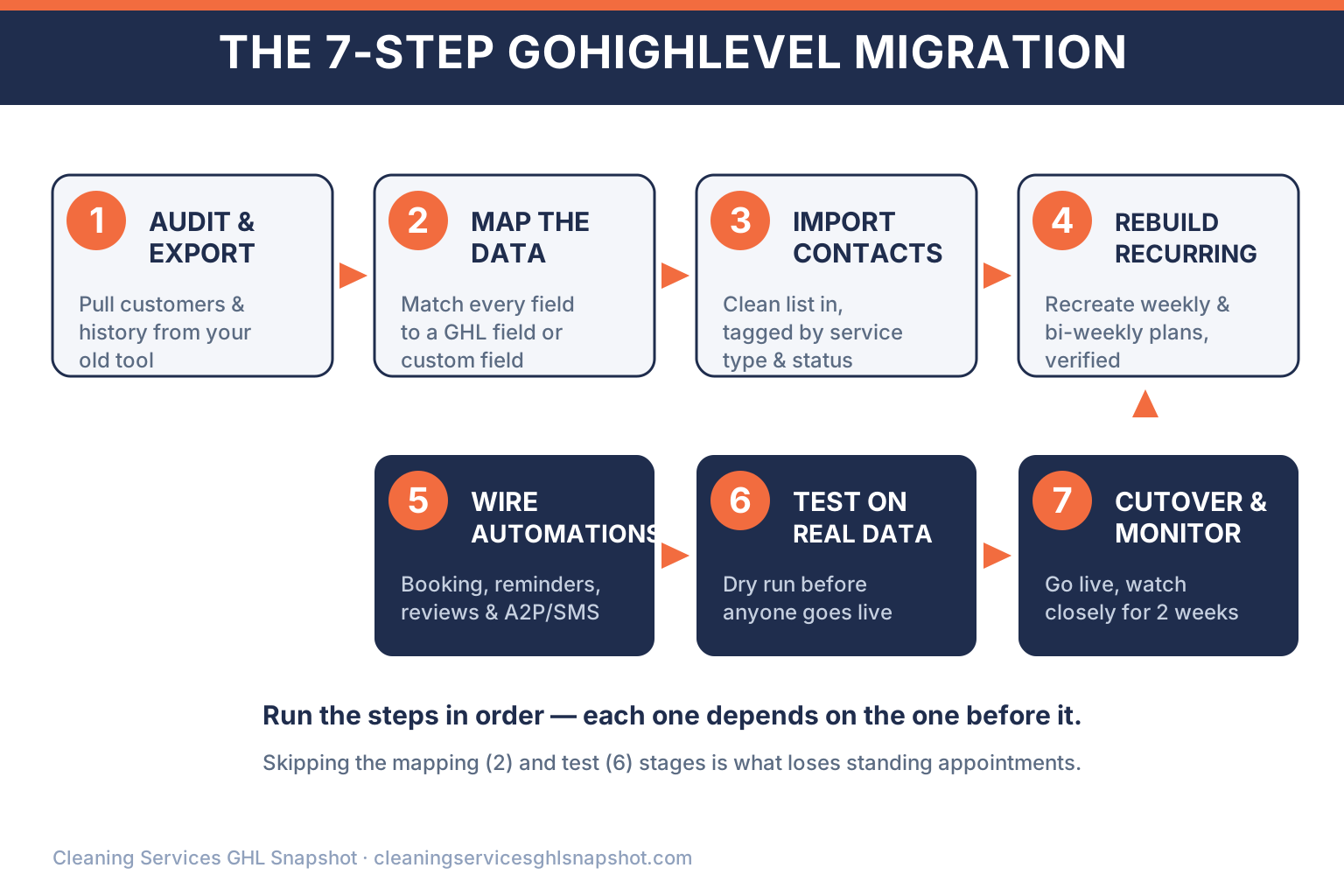
Step 1 — Audit & export
Pull a complete export from your current platform. Jobber, Housecall Pro, ZenMaid, and Launch27 all support CSV exports (or API access) of customers, properties, recurring visits, and job history. Audit what you actually have versus what you think you have — this is where you discover the 200 contacts with no phone number.
Step 2 — Map the data
Match every field in your export to a destination in GoHighLevel. Standard fields (name, phone, email, address) map to GHL contact fields; cleaning-specific fields (square footage, gate code, pets, service type, crew) become custom fields so nothing lands in a free-text blob. This mapping document is the spine of the migration.
Step 3 — Import contacts & properties
Import your cleaned, mapped customer list into GHL, tagging each record by service type (residential, commercial, Airbnb turnover) and status (active, lapsed, lead). Good tagging now is what makes your CRM segmentation and workflows work later.
Step 4 — Rebuild recurring plans
This is the step generic migrators botch. Every standing clean gets recreated in GHL as a recurring appointment or a recurring-booking workflow with the correct frequency, price, and next date — cross-checked against the recurring inventory you made in pre-flight. Your recurring revenue is the point of the whole business; treat it that way. (See building recurring revenue in a cleaning business.)
Step 5 — Wire the automations
Now rebuild the automations you documented — as native GHL workflows, not bolt-ons. At minimum: online booking and confirmations, appointment reminders, missed-call text-back, post-clean review requests, and rebooking sequences. Register your A2P/10DLC brand for SMS deliverability while you’re here.
Step 6 — Test on real data
Run a dry run against real records before anyone’s live. Book a test clean, confirm the reminder fires at the right time, trigger a review request, and check that a recurring plan generates its next appointment. Verify a sample of imported contacts field-by-field. Nothing goes live until this passes.
Step 7 — Cut over & monitor
Flip the switch during your chosen window, then watch closely for two weeks. Keep the old system in read-only mode as a reference (don’t delete the backup), and monitor for duplicate messages, missed reminders, or recurring plans that didn’t generate. Two weeks of attention here is what turns a migration into a non-event for your customers.
The migrations that go sideways aren’t the complicated ones — they’re the rushed ones. If you clean the data, map every field, and test against real records before cutover, moving a cleaning business to GoHighLevel is boring. Boring is exactly what you want when standing appointments are on the line.
What moves across from Jobber, Housecall Pro & ZenMaid
The most common question: “Will I lose anything?” Done properly, no. Here’s what transfers from the platforms cleaning operators most often leave — and what gets rebuilt (better) inside GHL.
What transfers to GoHighLevel — and what gets rebuilt
| Plan | Moves across intact | Rebuilt as native GHL recommended | Left behind |
|---|---|---|---|
| Price | Migrated | Upgraded | Retired |
| Feature 1 | Customer & property records | Online booking & confirmations | The separate texting subscription |
| Feature 2 | Recurring cleaning schedules | Reminder & no-show recovery flows | The standalone review tool |
| Feature 3 | Job & service history | Review harvesting automation | The disconnected email app |
| Feature 4 | Line-item pricing / quotes | AI caller & missed-call text-back | Manual re-keying between apps |
| Feature 5 | Tags, segments & contact status | Pipelines, dashboards & reporting | ~$3,000/mo of unused software |
Whether you’re leaving Jobber, Housecall Pro, ZenMaid, Launch27, or ServiceMonster, the pattern is the same: your data comes across, and your processes get rebuilt as automations that your old tool couldn’t run. That’s the difference between a lateral move and an upgrade.
DIY migration vs. done-for-you: the honest comparison
You have two real paths. Here’s the honest breakdown so you can choose with eyes open.
Running the migration yourself vs. a done-for-you GHL migration
| Plan | DIY migration | Done-for-you (us) recommended |
|---|---|---|
| Price | Your time | Fixed scope |
| Feature 1 | Learn CSV mapping by trial and error | Cleaning-niche field mapping, day one |
| Feature 2 | Rebuild recurring plans by hand | Recurring plans migrated & verified |
| Feature 3 | Rebuild every automation from scratch | Booking, reminders, reviews rebuilt |
| Feature 4 | You catch the data errors (or don't) | Tested against your real data pre-cutover |
| Feature 5 | Risk to live standing appointments | Zero standing appointments lost |
DIY is genuinely viable for a solo operator with a small, clean customer list and time to learn GoHighLevel. Where it gets expensive is the hidden middle: a few hundred contacts, live recurring plans, and automations you can’t afford to send by accident. That’s the zone where a botched frequency mapping quietly empties your Tuesday schedule, and where a specialist earns their fee several times over.
The economics favor getting it right the first time regardless of who does the work. Marketing automation returns $5.44 for every dollar spent, with payback in under six months (Nucleus Research) — but that return only starts the day your workflows are actually live and firing correctly. Every extra week your migration limps along half-broken is a week that ROI is on pause.
After cutover: the automations that make the switch pay off
Migrating is the means, not the end. The reason to be on GoHighLevel is what you can now automate in one place. Once you’re live, these are the flows that turn the switch into revenue:
- Speed-to-lead. Missed-call text-back and an AI caller that answers 24/7, so no lead waits — responding in 5 minutes instead of 30 makes you 21× more likely to qualify them (MIT / InsideSales Lead Response Management Study).
- Recurring conversion. Sequences that turn a one-time deep clean into a weekly account — the compounding engine of a cleaning business (recurring revenue playbook).
- Review harvesting. Post-clean review requests with smart routing, so happy customers land on Google automatically (review harvesting).
- A real CRM. Pipelines by service type, dashboards for rebooking rate and MRR, and win-back sequences that mine your existing list instead of always buying new leads (CRM & workflows).
If you’d rather skip the from-scratch build entirely, the Cleaning Snapshot installs all of these workflows into your fresh GHL account in 24 hours — a natural companion to a migration. And if GoHighLevel eventually can’t do something you need — a route-aware dispatch view, a square-footage quote engine, a customer portal — that’s exactly what custom GHL development is for.
Frequently asked questions
Migrating a cleaning business to GoHighLevel — common questions
How do I migrate my cleaning business from Jobber or Housecall Pro to GoHighLevel?
Follow seven steps in order: audit and export your data (Jobber, Housecall Pro, ZenMaid, and Launch27 all support CSV/API export), map every field to GoHighLevel, import your cleaned contacts and properties, rebuild your recurring cleaning plans, wire up your booking and follow-up automations as native GHL workflows, test everything against real data, then cut over and monitor for two weeks. Skipping the mapping and test stages is what causes standing appointments to disappear. A cleaning-niche GHL migration team can run the whole sequence for you.
Will I lose my recurring clients or standing appointments when I switch?
Not if the migration is done properly. Recurring plans are the step generic migrators botch — weekly and bi-weekly cleans often import as one-time jobs because the frequency field wasn't mapped. Done right, every standing clean is recreated in GHL with the correct frequency, price, and next date, then cross-checked against your recurring inventory before cutover. That's why a dedicated recurring-revenue check is built into the process.
How long does a GoHighLevel migration take for a cleaning company?
It depends on data volume and how many automations you're rebuilding, but the biggest variable is data hygiene, not size. Since 76% of organizations report less than half their CRM data is accurate, the cleanup and mapping stages usually take longer than the import itself. Budget time to deduplicate and verify before you export — an afternoon there saves a week of firefighting after cutover.
Is GoHighLevel worth switching to for a cleaning business?
For most growing operators, yes — because it consolidates a stack of single-purpose tools into one login. SMBs overspend about $3,000/month on software they don't fully use and lose ~25 hours a week to manual admin across disconnected apps. GoHighLevel now powers 2.2 million businesses, and marketing automation returns $5.44 per $1 spent once your workflows are live.
Should I migrate myself or hire someone?
DIY is fine for a solo operator with a small, clean list and time to learn GHL. The risk zone is a few hundred contacts, live recurring plans, and automations you can't afford to send by accident — that's where a botched field mapping quietly empties your schedule. A done-for-you migration maps cleaning-specific fields correctly, migrates and verifies recurring plans, and tests against your real data before cutover, so no standing appointment is lost.
What happens to my customer data and job history?
With a proper migration, customer records, property details, recurring schedules, job history, and line-item pricing all move across intact, while your booking, reminder, and review processes get rebuilt as native GHL automations. Keep a full backup of your old system and leave it in read-only mode through the two-week monitoring window as a reference — never delete it until you're confident everything transferred correctly.
About the author
Darnell Pierce is a GHL Automation Consultant based in Atlanta, GA. He runs a small GoHighLevel agency serving home-service operators, with cleaning companies making up the bulk of his book. He’s allergic to half-built funnels and TCPA shortcuts, and he’d rather ship one bulletproof quote-to-book flow than ten clever-but-fragile ones. He covers the agency side of the business: what to white-label, what to charge, and how to onboard — or migrate — a cleaning client in a week without breaking their existing calendar.