
It is 9:52 on a Tuesday and your phone buzzes for the third time. Same number. It is the Hendersons, booked for a 9 to 11 window, and the message reads: “Is anyone actually coming today??” Your crew is fine, twelve minutes out behind a school bus. But the customer does not know that, so she has spent forty minutes assuming she got forgotten, and by the time the van pulls up she is already annoyed. You will get the clean done. You might not get the five-star review. And you lost ten minutes answering a question she should never have had to ask.
Here is the fix, and it is not a bigger office or a dispatcher. It is a handful of texts that go out automatically on the day of the job, so the customer always knows what is happening before they have to wonder. Done right, a day-of-service text system kills the “where are you?” calls, cuts the wasted trips to locked houses, and turns the most nerve-racking part of the customer’s day into the calmest. This is the six-message system I set up for operators, with the exact copy to paste in.
Key Takeaways
- Silence makes customers anxious, not delay. A crew twelve minutes late is not the problem; a customer who does not know the crew is coming is. Nearly half of homeowners say an “on my way” text gives them the most reassurance before a visit (Housecall Pro, 2025).
- Texts get seen in time to matter. 87% of consumers have seen a new text within 15 minutes and 32% check immediately (EZ Texting, 2026). A text lands before the crew does; an ETA email does not.
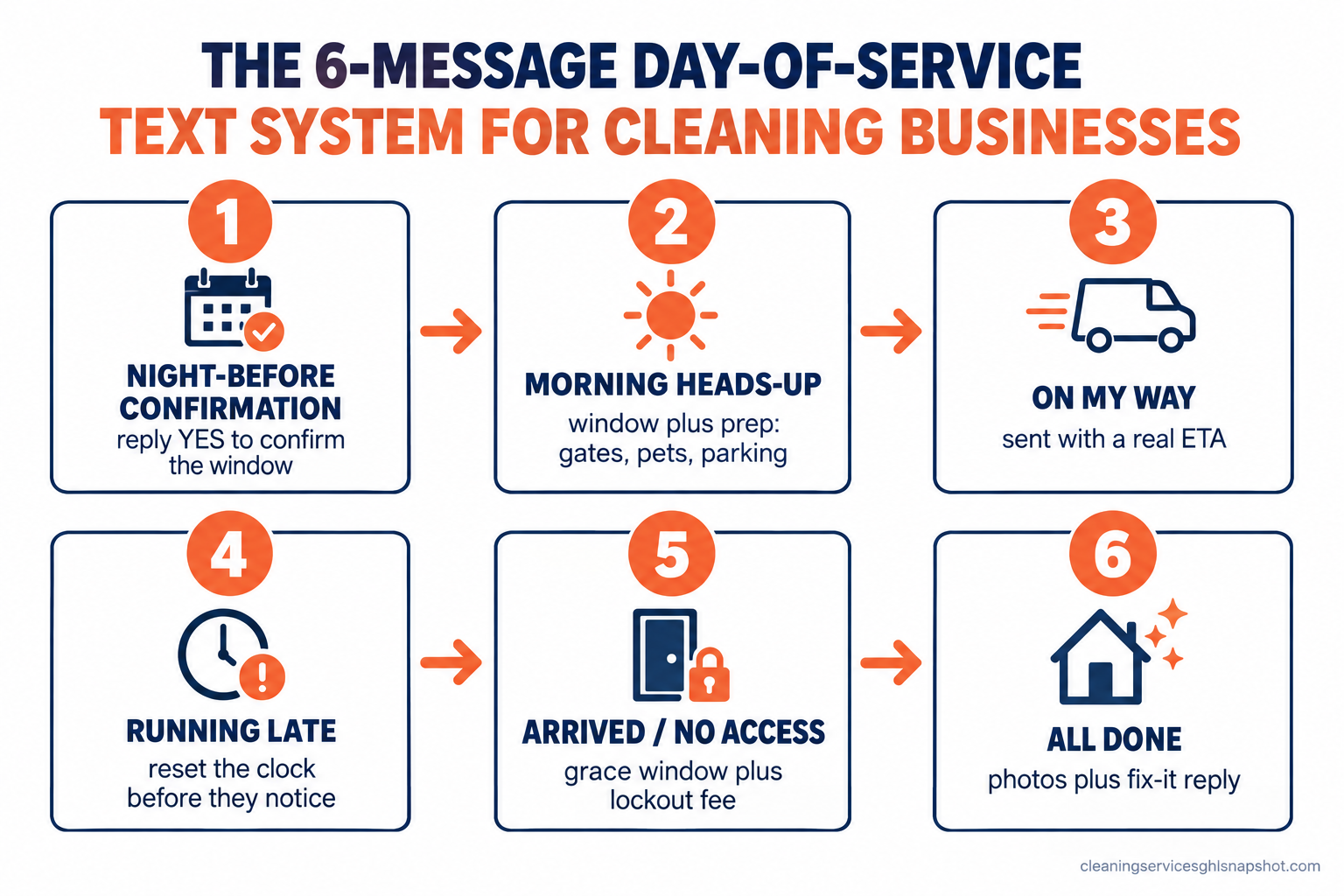
- Six messages run the whole day: night-before confirmation, morning heads-up, the “on my way” ETA, the running-late text, the arrival and no-access protocol, and the “all done” wrap-up. Every one below is copy you can steal.
- The lockout text pays for itself. A grace window, a code request, and a stated fee turn a wasted trip into either an opened door or a legitimately billed reschedule.
- Mind the rules. Texting needs opt-in consent and a working STOP (TCPA), and the number sending these must be 10DLC-registered or carriers filter it.
Table of contents
- What a silent morning actually costs you
- The day-of text system, start to finish
- Stage 1: The night-before confirmation
- Stage 2: The morning-of heads-up
- Stage 3: The “on my way” text with a real ETA
- Stage 4: The running-late text
- Stage 5: Arrival and the no-access protocol
- Stage 6: The “all done” completion text
- The same system at three sizes
- The rules you cannot skip
- The objections I hear from owners
- Frequently asked questions
- The bottom line
What a silent morning actually costs you
Start with the wasted trip, because that one is pure loss. A crew drives across town, nobody is home, the gate is locked, the code fails, no answer on the phone. Now you are eating the drive, the labor, and the empty slot, and you still have to reschedule. At a May 2025 median wage of $17.07 an hour for house cleaners (U.S. Bureau of Labor Statistics), a two-person crew idling outside plus the round-trip drive runs $25 to $35 in labor before gas, and the bigger cost is the hole it punches in the day.
Then there are the “where are you?” calls. They never show up on a profit-and-loss statement, but they eat your morning and sour customers who were happy the night before. The chart below shows why a text, not a call or email, is the tool for this: people see texts almost immediately.
Share of U.S. consumers who have seen a new text by each time mark (cumulative). Source: EZ Texting, 2026 Consumer Texting Behavior Report.
Put a number on it. Two lockouts a month at about $90 each is over $2,000 a year, before the “where are you?” calls eating your mornings. The system below removes most of both for the price of setting up some texts once.
Illustrative annual cost of no-access trips at roughly $90 per wasted trip (two-person crew labor plus the lost slot). Labor is based on the BLS May 2025 median cleaner wage; your number depends on crew size and drive distance.
The day-of text system, start to finish
The whole system is six messages, each tied to a moment in the day and sent automatically off the job’s status instead of someone remembering to type it. Build them once, wire them to triggers, and they fire on their own.
| Stage | When it fires | What it does |
|---|---|---|
| 1. Night-before confirmation | ~5 p.m. the day before | Confirms the window, asks for a YES, catches cancels early |
| 2. Morning heads-up | Start of the morning | Restates the window and asks the customer to prep access, pets, parking |
| 3. “On my way” | Crew leaves the prior stop | Gives a real ETA so the customer stops wondering |
| 4. Running-late | When the window is at risk | Resets expectations before the customer notices you are late |
| 5. Arrival + no-access | Crew arrives | Confirms arrival, and if nobody’s home, runs the lockout protocol |
| 6. “All done” | Job marked complete | Wraps up, drops photos, invites a fix before a bad review |
The rest of this guide is each stage, the copy, and how it breaks. Every message uses merge fields like {{first_name}} and {{company}} so it reads personal, not like a blast. If you already run appointment reminders, Stage 1 overlaps, so wire them together instead of sending two near-identical texts.
Stage 1: The night-before confirmation
The night-before text is your early-warning system, and it is also the confirmation nearly 70% of consumers say they want by text (Podium; Housecall Pro, 2020). Sent around 5 p.m., it confirms the window and asks for a one-word reply. A customer who is going to cancel usually knows by the evening before, and a YES prompt pulls that cancel forward twelve hours: the difference between refilling the slot and eating it.
How it breaks: the common mistake is treating a non-reply as a confirmation. It is not. No YES by 8 p.m. is your cue to send a follow-up or have the office call in the morning, not to roll up to a dark house. The second mistake is sending it too early: a confirmation three days out gets forgotten, while the evening before sticks.
Stage 2: The morning-of heads-up
This one gets the customer to prep the house so your crew does not lose fifteen minutes on arrival: unlocked gate, dog crated, a spot to park, and where the key or code is. Sent first thing, it restates the window so the customer plans their morning around you.
How it breaks: if your windows are fiction, this text makes it worse. Telling a customer “8 to 10” and arriving at 11:30 trains them to ignore every message you send. Only promise a window your routing can hit, and if your mornings run tight, widen it to an honest three-hour range rather than a two-hour window you blow half the time. Tight routing is its own project; route optimization for cleaning businesses is where that gets fixed.
Stage 3: The “on my way” text with a real ETA
This is the keystone message. Nearly half of homeowners say an “on my way” text gives them the most reassurance before a visit (Housecall Pro, 2025), because it is the moment “sometime this morning” becomes a real person heading to their door. Fire it when the crew leaves the previous stop, with an honest ETA.
That last line does double duty: it feels like service, and it surfaces the “actually, can you focus on the kitchen” requests before the crew walks in, instead of as a complaint afterward.
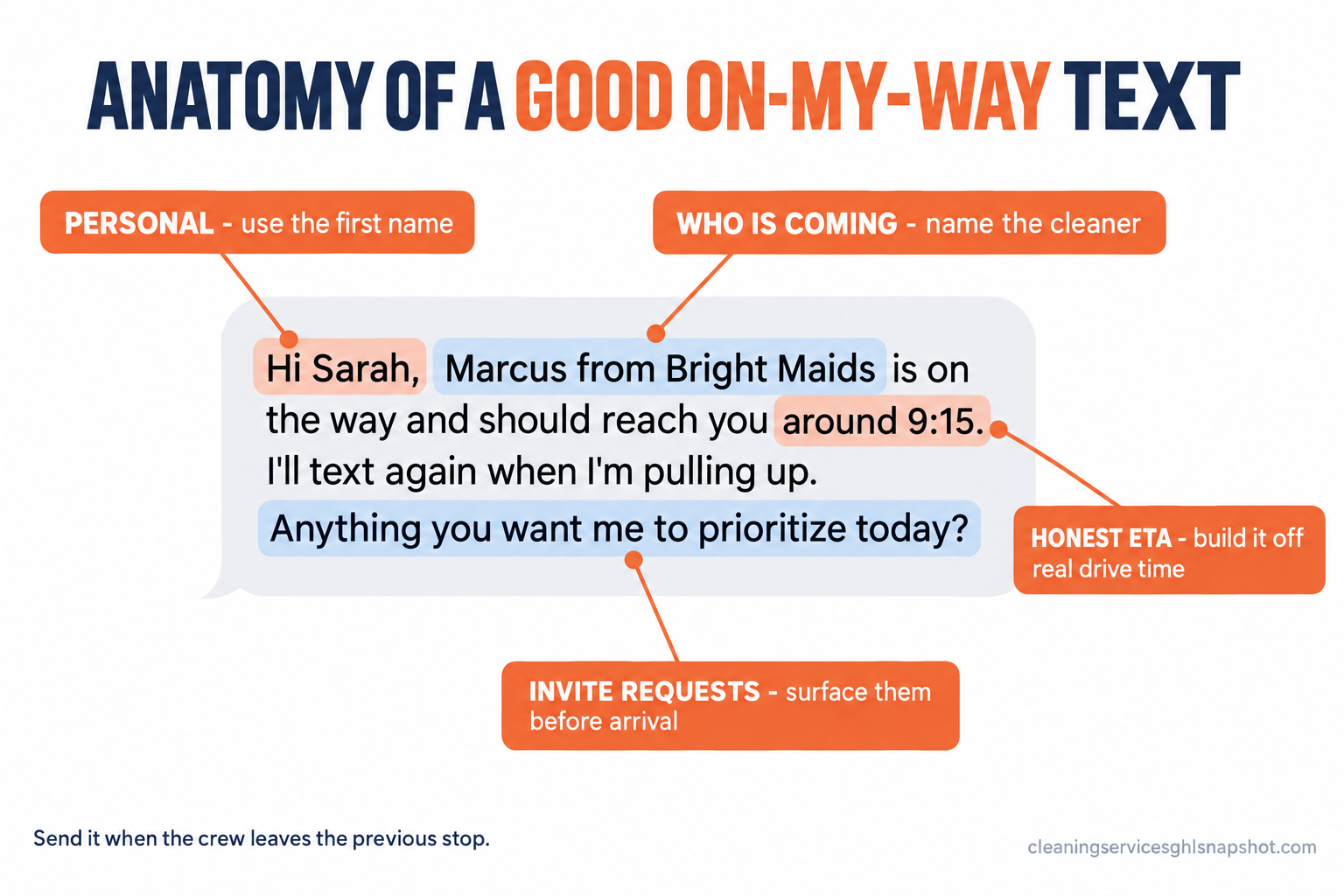
How it breaks: an ETA you miss is worse than no ETA. Say 9:15 and show at 9:45 and you have manufactured a late arrival out of an on-time one, so build the message off realistic drive time; if the plan slips, that is what Stage 4 is for. The other failure is sending it from a crew member’s personal cell: no record, no coverage when they quit, no number the customer can reach later. These texts come from the business number.
Stage 4: The running-late text
Every operator runs late sometimes. Being late is survivable; being late in silence is what gets you the one-star review. The running-late text resets the customer’s clock before they start watching it, and because you sent it first, you look on top of things instead of caught out.
How it breaks: the mistake is waiting until you are already late to send it. If the window ends at 11 and you know at 10:15 you will not make it, the text goes at 10:15, not 11:05. One clean sentence of ownership and a new time beats three paragraphs of excuses that make it sound worse than it is.
Stage 5: Arrival and the no-access protocol
Two messages live here. The first is easy: a quick “we are pulling up.” The second saves you real money: what the crew sends when nobody is home and they cannot get in.
The no-access text is where most operators wing it, and winging it costs them. A good lockout message does three things at once: states the crew is there, gives the customer a fast way to fix it, and names the consequence so a reschedule later is not a fight.
How it breaks: a lockout fee you never put in writing is a fee you cannot charge. The policy has to live in the cancellation and access policy the customer agreed to at booking, or the text is a bluff. The other failure is no grace window: fifteen minutes of documented waiting is what makes the reschedule fair and the fee defensible, and it gives a customer who is five minutes away the chance to let you in.
Stage 6: The “all done” completion text
The last message closes the loop: it confirms the work is done, drops a couple of before-and-after photos as proof, and opens a private channel for complaints so a frustrated customer texts you instead of Google.
How it breaks: firing the review ask inside this same text is usually a mistake. Give the customer a beat to walk the house; the review request works better a few hours later, off the photos, which is its own sequence in the before-and-after photo system. This text’s only job is to prove the work and catch problems early.
The same system at three sizes
The six messages do not change. What changes is who is pressing go, and whether anything is pressing go at all.
Solo operator or one van. You are the crew and the dispatcher. Automate the night-before and morning texts off the schedule so you never think about them, send the “on my way” and arrival texts with one tap as you leave each stop, and keep the lockout text as a saved template. The win is you stop fielding “where are you?” calls while you are elbow-deep in someone’s bathroom.
Mid-size, three to eight crews. The texts cannot depend on you remembering. Automate stages 1, 2, and 6 off job status, and give crew leads a one-tap way to trigger stages 3, 4, and 5 from the field, not free-typed messages. One person watches the board and steps in only on exceptions. At this size a missed “running late” text becomes a cluster of angry calls.
Large residential or janitorial, many crews and night work. Here the day-of system doubles as your operations log. Every text is timestamped and tied to the job, so when a commercial client disputes whether your night crew showed, you have an arrival text at 9:04 p.m., and the “all done” photos become proof of service for the contract. At this scale a personal-cell setup is a liability: the thread, the history, and the proof walk out the door when an employee does.
The rules you cannot skip
Day-of texts are mostly transactional, but “transactional” is not “exempt.” Two things are non-negotiable.
Collect consent at booking with a plain checkbox (“Text me about my appointments”), keep the texting number registered and separate from marketing blasts, and honor STOP automatically. None of this is hard; it is just the step most operators skip until a carrier starts blocking them.
The objections I hear from owners
“Won’t all these texts annoy customers?” Only if they are generic or badly timed. These are the opposite of marketing spam; they are the information the customer is actively hoping for, which is why nearly half call an “on my way” text the most reassuring thing you can send (Housecall Pro, 2025). A quiet, accurate heads-up is what makes customers stop calling.
“I already text from my cell, why change?” A personal cell has no record, no coverage when you are busy, no automation, and no compliance. The day a crew member quits, every customer conversation on their phone leaves with them. A business number keeps the history on the job and lets the texts fire on their own.
“Do I need to be technical to set this up?” No. You write six short messages once and attach them to moments in a job: booked, morning, en route, late, arrived, done. The platform does the sending. If building it is the part that stalls you, that is what a done-for-you setup solves.
“What if the customer never gave a number?” Then Stage 1 is also your data-cleanup prompt. Collect a mobile and a text opt-in at booking, and backfill recurring customers with a one-time “want appointment texts?” ask. Within a few weeks most of your book is reachable.
Frequently asked questions
How far ahead should the "on my way" text go out?
Send it when the crew leaves the previous stop, with an ETA built off real drive time. That usually lands 15 to 40 minutes out, enough for the customer to unlock a door or move a car without the ETA drifting.
Text or email for day-of updates?
Text, without question. 87% of consumers have seen a new text within 15 minutes (EZ Texting, 2026). An email about arrival time is read, if at all, long after the crew has come and gone. Keep email for receipts and newsletters.
Is a lockout fee actually enforceable?
Only if the customer agreed to it in writing before the job, in your service agreement or cancellation policy, and you documented the no-access attempt. The text that states a grace window and names the fee is your good-faith record. Without the written policy behind it, it is just a threat.
Do appointment texts need TCPA consent if they are not marketing?
Yes. You still need the customer's opt-in and a working STOP, even for transactional messages. Keep these in their own 10DLC campaign, separate from promotions, so a marketing opt-out does not kill the arrival texts customers actually want.
Can I automate these or do I have to send them manually?
A mix works best. Automate the predictable ones (night-before, morning, all-done) off job status, and give crews a one-tap trigger for the field ones (on my way, running late, arrived) so nobody is free-typing while driving.
The bottom line
Back to the Hendersons. Run the day-of system and that Tuesday looks different: a confirmation the night before, a morning heads-up with her window, and at 9:40 a text that said the crew was twelve minutes out behind a school bus. She never picked up the phone, because she never had to wonder. The clean happened on time, the review was five stars, and you spent your morning on sales instead of status updates.
That is the whole trade: six messages, built once, that replace a morning of anxious calls and wasted trips with a customer who always knows what is happening. Wire it together yourself, or install a version already built and be running it this week.