
Marcus was your best crew lead for two years, and a dozen of your recurring customers had his cell saved. They texted him to reschedule, to leave gate codes, to ask if he could squeeze in the baseboards. Then Marcus quit. He walked out with his phone, and those customers kept texting the only number they had, which now rings a guy who does not work for you. You found out three weeks later when one called the office, annoyed, asking why nobody had answered her about moving her Thursday clean.
That is what running a cleaning business off personal cell phones costs, and it is not rare. The fix does not require you to learn the word “CRM.” It is a dedicated business number, a shared inbox your whole team can see, and a few rules so your texts actually get delivered. This is the whole setup, in order, with the exact messages to paste in.
Key Takeaways
- Your personal cell is a liability. No record, no coverage when you are busy, and the whole thread walks out the door when an employee quits.
- Texting beats calling and email here. Texts get a 51.2% open rate against 23.8% for email (NP Digital, 2025), and more than half of consumers say they texted a business and got silence back (Sender, 2025).
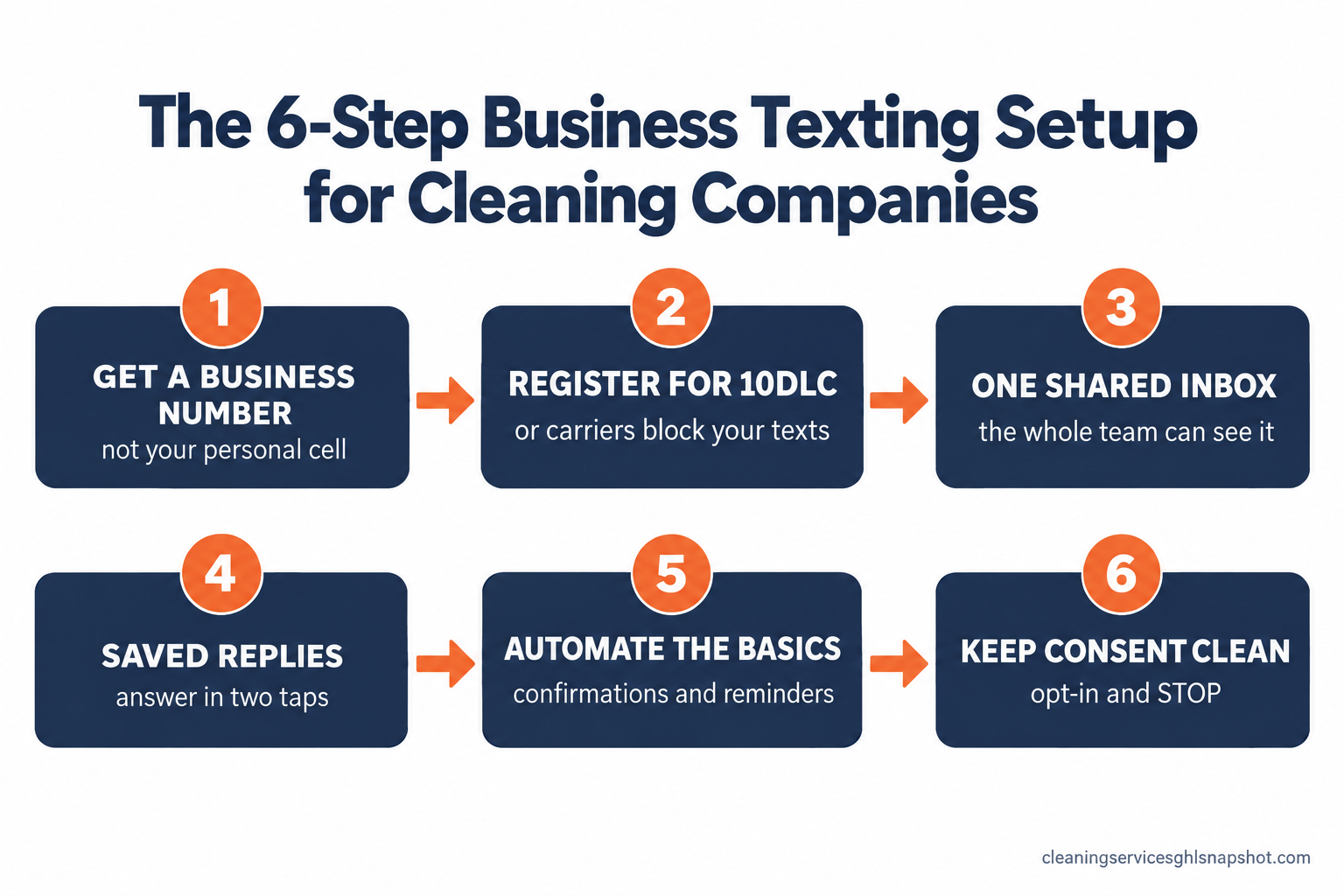
- Six steps run the setup: a real business number, 10DLC registration, one shared inbox, saved replies, automation, and clean consent.
- Unregistered numbers get blocked, not throttled. Since February 3, 2025, US carriers block texts from numbers not registered for A2P 10DLC (Telnyx). Flip on texting without registering and your messages silently fail.
- The sticker price is not the real price. Some tools bill texts by the bundle or gate two-way texting behind a higher plan.
Table of contents
- What running texts off your cell actually costs you
- The business texting setup, start to finish
- Step 1: Get a dedicated business number
- Step 2: Register the number for 10DLC so texts deliver
- Step 3: Put every conversation in one shared inbox
- Step 4: Build saved replies you can send in two taps
- Step 5: Automate the texts that never change
- Step 6: Keep consent and opt-out clean
- The same setup at three sizes
- The sticker price is not the real price
- The objections I hear from owners
- Frequently asked questions
- The bottom line
What running texts off your cell actually costs you
The Marcus problem hurts most and shows up least on a spreadsheet. Every conversation on a personal phone belongs to whoever holds it, so when they leave, the history, the relationship, and often the customer leave too, because the number they trusted now goes to a stranger. You did not lose one employee. You lost a book of recurring revenue you spent years building.
Then there is the silent cost: the texts you never see. A message that lands on your cell while you are elbow-deep in a bathroom sits unread for three hours, and a reschedule becomes a cancellation, a quote becomes a job that went to whoever answered first. More than half of consumers say they texted a business and never heard back (Sender, 2025), and the one who gets silence just books the next company on the list.
Texting is the right channel because people read texts and ignore everything else. A study of 2,731 campaigns in Q1 2025 put the SMS open rate at 51.2% against 23.8% for email (NP Digital, 2025).
Open rate by channel, across 2,731 campaigns and 57 companies in Q1 2025. Source: NP Digital, 2025.
The problem is never the channel; it is texting with no system behind it. At a May 2025 median house-cleaner wage of $17.07 an hour (U.S. Bureau of Labor Statistics), even the nightly hour spent scrolling through forty unlabeled threads is not free. The setup below fixes it, once.
The business texting setup, start to finish
The whole thing is six steps that build on each other, in order: a dedicated business number, 10DLC registration, one shared inbox, saved replies, automation, and clean consent. Skip Step 2 and nothing delivers; skip Step 3 and you are back on a personal phone with extra steps. Here is each one, how it breaks, and the copy to steal.
Step 1: Get a dedicated business number
Get a dedicated business phone number that your company owns, separate from anyone’s personal phone. Customers text that one number, whoever is working. It buys three things: the history lives with the business, so when Marcus quits his threads stay; more than one person can answer, so a text that arrives while you are on a ladder still gets a reply; and you can print it on your website, truck, and Google profile without your personal phone ringing at dinner.
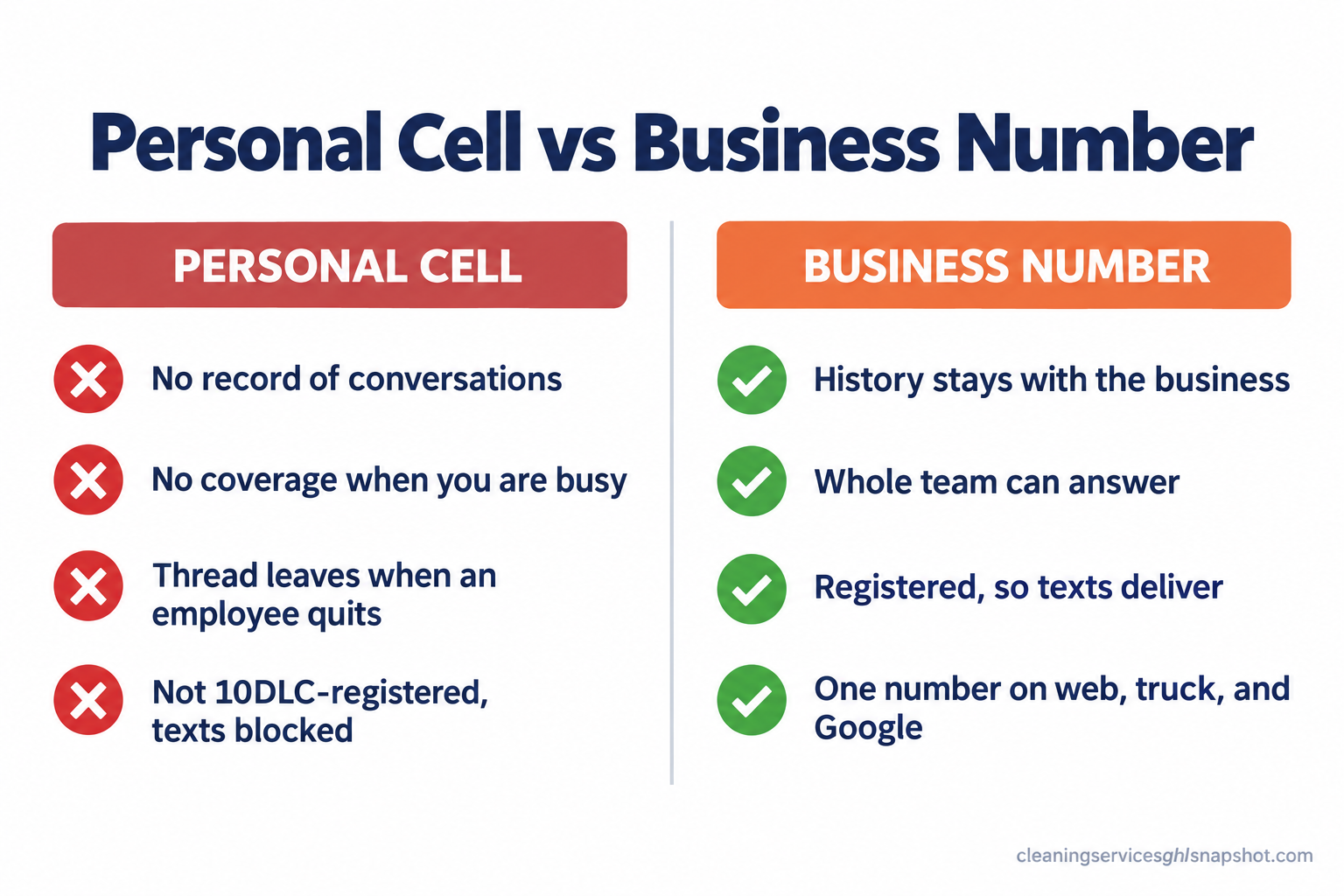
How it breaks: the mistake is keeping one foot in the old world. Hand your cell to “important” customers on the side and you run two systems with split records. Pick the business number, move everyone over a couple of weeks, and point your personal voicemail there. The same goes for crews texting from their own phones: make the business number the rule, not the suggestion.
Step 2: Register the number for 10DLC so texts deliver
This is the step almost everyone skips, and it is why so many operators cannot understand why their texts “don’t work.” Any US number sending business texts has to be registered under a system called A2P 10DLC, which separates a legitimate local business from a spammer. Since February 3, 2025, carriers block texts from unregistered numbers altogether, not just slow them (Telnyx).
Here is the part that catches people. Flip on the texting feature inside a booking tool without registering a campaign, and the texts look like they send on your screen. They just never arrive. No error, no bounce. You think the customer is ignoring you. The customer never got the message.
How it breaks: the common failure is treating registration as something to “get to later.” There is no later; unregistered is blocked. The other trap is a vague use case or spammy-looking language, which gets your campaign rejected or throttled. Describe what you actually do, plainly: appointment confirmations, scheduling, and service updates for customers who opted in.
Step 3: Put every conversation in one shared inbox
A number is only half the fix. The other half is a place where every text to and from it shows up and more than one person can see and answer it. With a shared inbox, a message lands somewhere your office manager, you, and a crew lead can all reach, so when you are busy someone else answers and the whole history stays in one place. Speed matters: a text gets a reply far more reliably than any other channel, and the business that answers within minutes usually books the job.
Share of recipients who reply, by channel. SMS is replies within 24 hours; email is a typical 1 to 3% range at its midpoint. Source: Salesmessage, 2026.
How it breaks: the failure is a shared inbox with no owner. If “anyone can answer” turns into “everyone assumes someone else did,” messages still fall through. Assign it: one person owns the inbox during business hours and clears it, and after hours an auto-reply sets expectations. The saved replies in the next step keep three people from answering the same customer three different ways.
Step 4: Build saved replies you can send in two taps
You get the same five questions every week. “Can you text me a quote?” “Can we move Thursday?” “Are you insured?” “Do I need to be home?” “How do I pay?” Writing a fresh answer each time is slow. Build them once as saved replies, send the right one in two taps, and leave a blank for the one detail that changes.
How it breaks: saved replies go wrong when they read like a form letter. Keep merge fields to the first name and the one changing detail, and read each one aloud once so it sounds like you. The other failure is building forty replies nobody can find, so keep it to the ten you use, named clearly. For a bigger library, see the cleaning text message templates.
Step 5: Automate the texts that never change
Some texts should never need a human. The booking confirmation, the day-before reminder, the “on my way,” the “all done” with photos, and the review ask a few hours later are the same every time except for the details. Wire them to fire off the job’s status, and your team only touches the conversations that need a person. This is the layer that gives you your evenings back.
The day-of messages have their own playbook in the day-of-service text system, and the review request works best as a timed sequence covered in getting more Google reviews. The missed-call text-back, where a call you cannot answer becomes a text, is one of the highest-value automations to turn on.
How it breaks: automation breaks when it fires into a vacuum. If a reminder goes out automatically but the reply lands in an inbox nobody watches, you have automated the sending and ignored the receiving, which is worse than not sending at all. The other failure is automating too much too soon: turn on the confirmation and reminder first, then add the next one in a couple of weeks.
Step 6: Keep consent and opt-out clean
None of this works if you are texting people who never agreed to it. Under the TCPA you need the customer’s consent, and every number must honor a STOP reply (FCC telemarketing and robocall rules). Collecting consent is one checkbox at booking, and a real platform handles STOP automatically. Keep the two kinds of texts separate, too: a customer who opts out of promos should not lose the arrival texts they want.
How it breaks: the biggest failure is buying or scraping numbers and blasting them, which gets your campaign flagged, your delivery tanked, and is the fastest route to a TCPA complaint. Text people who gave you their number, honor every STOP instantly, and keep opt-in language visible where they hand it over.
The same setup at three sizes
The six steps do not change. What changes is how much runs on its own and who watches the inbox.
Solo operator or one van. The win is not coverage, it is sanity. Get the business number so your personal phone stops ringing at dinner, register it, and lean on automation and saved replies. Confirmations and reminders fire on their own, and you answer the handful of real conversations between jobs.
Mid-size, three to eight crews. Now coverage is the point. Several people share the inbox, so a reschedule text at 9 a.m. gets answered whether or not you are free. Assign one owner per day, give crew leads a limited way to send field texts from the business number, and automate everything predictable. At this size, personal-phone texts are how you lose customers quietly, one departing employee at a time.
Large residential or janitorial with night crews. Here the shared inbox doubles as your record. Every text is timestamped and tied to the account, so when a commercial client claims your night crew never confirmed, you have the thread. A personal-cell setup across a large team is an open liability.
The sticker price is not the real price
If you already pay for cleaning software, you might assume texting is included. Sometimes it is, sometimes the real cost is hiding. Here is how texting bills across the tools cleaning operators use most, from each vendor’s own pricing.
| Tool | Entry price | Two-way customer texting | The catch |
|---|---|---|---|
| ZenMaid | $39/mo (Pro) + $14/user | Automated SMS on the plan | Texts billed separately: bundles start at $14 per 125 messages, about $0.11 each (ZenMaid) |
| Jobber | $29/mo (Core, annual) | Starts on the Grow plan | Grow is $149/mo annual, so texting customers back means jumping several tiers (Jobber) |
| Housecall Pro | $59/mo (Basic, annual) | Quotes by text on Basic; more higher up | Extra seats run $35/mo each on Max, so a team adds up fast (Housecall Pro) |
None of these are bad tools, but read the texting line before you sign: “it has texting” and “my whole team can text every customer for one predictable price” are not the same sentence. For where these bills grow, see the Jobber pricing breakdown and the Housecall Pro hidden fees post. The other model is a flat platform where the number, inbox, automations, and 10DLC campaign live in one place, the approach behind our SMS automation feature.
The objections I hear from owners
“My cell works fine, why change?” It works until it does not, and the failure is expensive. The day a crew member quits, every customer conversation on their phone leaves with them, and you have no coverage when busy and no record in a dispute. “Fine” is the word for a problem that has not cost you a customer yet.
“Do I need to be technical to set this up?” No. You pick a number, fill out a registration form the platform hands you, write about ten short replies, and switch on a couple of automations. The hardest part is the discipline of moving everyone off the old phone, which is exactly what a done-for-you setup removes.
“I already pay for software with texting, so I am covered, right?” Maybe. Check two things: whether real two-way customer texting is on your plan or two tiers up, and whether your number is actually registered for 10DLC. Plenty of operators pay for a feature that is gated or quietly getting blocked.
Frequently asked questions
Can I just use a Google Voice number for business texting?
You can text from it, but it is a weak fit. Google Voice has no shared team inbox, no automation off job status, and no A2P 10DLC business registration, so you keep most of the problems you are trying to leave behind.
What is A2P 10DLC and do I really have to register?
A2P 10DLC is the US system that lets carriers verify a business is a legitimate sender on a standard 10-digit number. Yes, you must register. Since February 3, 2025, carriers block texts from unregistered numbers entirely, so your messages silently fail (Telnyx). It ties to your EIN and clears in a few days.
Will customers find business texts annoying?
Not the ones they signed up for. Confirmations, reminders, and arrival texts are information customers want, which is why texts get read far more than email. Annoyance comes from texting people who never opted in, so keep consent clean and marketing separate from service texts.
What happens to my old customer texts when I switch?
They stay on whatever phone they were on, which is the problem a business number solves going forward. Send the 'here is our new number' text to active customers so new conversations start in the shared inbox, and within a few weeks the old threads stop mattering.
Do reminder and confirmation texts still need consent?
Yes. Even service and reminder texts need the customer's opt-in and a working STOP under the TCPA. Collect consent with a plain checkbox at booking, keep service texts in a separate campaign from marketing, and honor opt-outs automatically.
The bottom line
Picture the Marcus story again, with this setup in place. He still quits, because people quit. But his customers were always texting the company number, so those threads sit in the shared inbox. Your office manager picks up right where he left off, and the customer moving her Thursday clean gets an answer in four minutes from someone who can see the whole history. Nobody noticed he was gone, because nothing walked out the door with him.
That is the trade: a dedicated number, a shared inbox, a quick registration, and a handful of saved replies, built once, so your customer relationships belong to your business instead of a phone you do not control. Set it up from the six steps above, or install a version already built and be texting from a real business number this week.