
It is Friday at 4pm. The crews are done, the vans are back, and you are sitting with your phone, not your mop, chasing money. The Hendersons still owe you for Tuesday’s deep clean. The office park owes you for two weeks of night service. And Mrs. Alvarez, cleaned every other Thursday for a year, keeps saying “I’ll send it this weekend” and never does. You draft three polite-but-firm texts, feel cheap doing it, and know that Monday you will do it again. That is not a cash-flow problem. It is a collection problem, and you built it the day you decided to clean first and ask for money later.
The fix is not a louder reminder. It is to get paid the way every gym and streaming service already does: hold a card on file, and charge it the moment the job is finished. This is the six-step system that moves your cleaning business from “invoice and hope” to “clean and get paid,” the exact scripts to put a card on file without scaring anyone off, what the tools actually cost in 2026, and how it changes whether you are solo, running a mid-size residential crew, or bidding janitorial contracts.
Key Takeaways
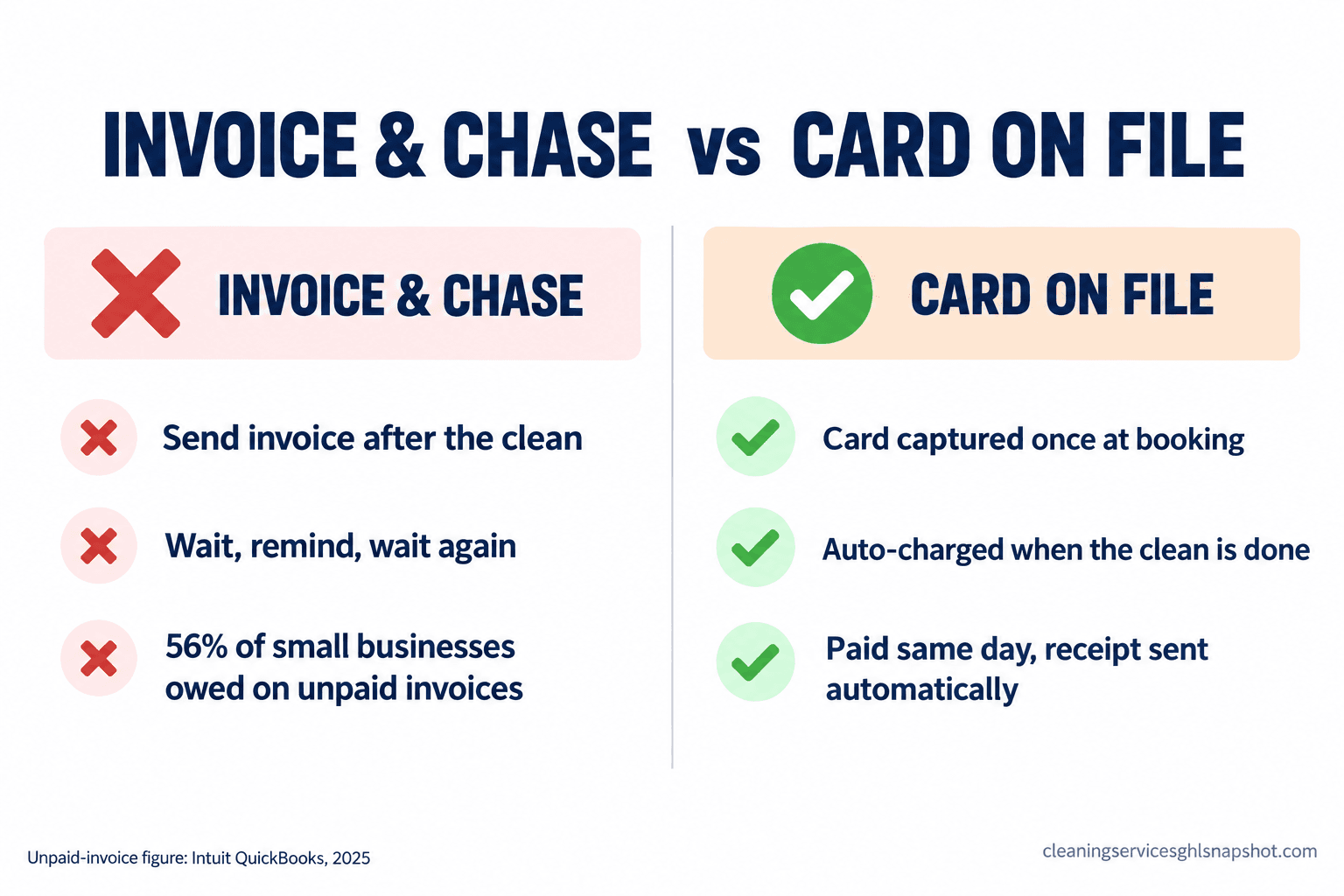
- Chasing invoices is unpaid admin work that scales with your business. 56% of US small businesses are owed money on unpaid invoices, an average of $17,500 each (Intuit QuickBooks, 2025). Every clean you finish before you get paid is a small loan to the client.
- Card on file flips the default. You get permission to charge once, at booking, and the system collects on completion. No invoice, no reminder, no awkward text.
- The fee is cheaper than the chase. A card charge runs 2.9% plus 30 cents (Stripe), about $4.65 on a $150 clean, far less than an hour of your Friday spent collecting.
- A declined card is the only real leak. Automate the retry and the “update your card” text and even that closes.
- Build it as a system, not a policy. A rule you have to remember to enforce is a rule that dies the first busy week.
Table of contents
- What chasing invoices actually costs you
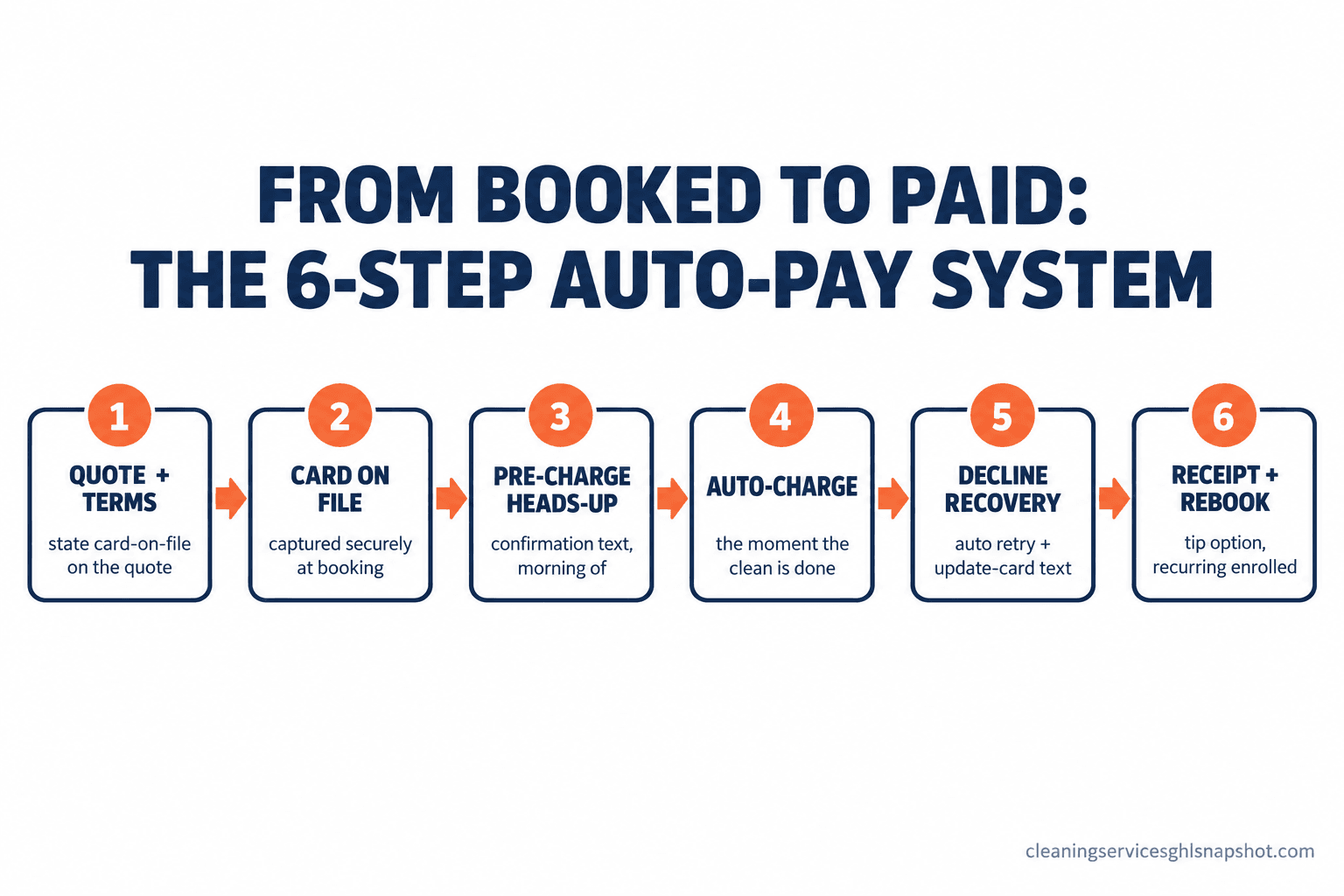
- The 6-step get-paid-automatically system
- The exact card-on-file scripts you can steal
- What the tools actually cost in 2026
- The same system at three sizes of business
- Card on file, TCPA, and PCI: staying on the right side
- The objections I hear from owners
- Frequently asked questions
- The bottom line
What chasing invoices actually costs you
Every clean you deliver before payment clears is a short-term loan from your business to your client, and cleaning runs on thin margins and real payroll. With about 860,670 maids and housekeeping cleaners employed at a median $17.07 an hour (BLS OEWS, May 2025), you pay your crew on your schedule whether or not the client pays on theirs. When collections drag, you float payroll with your own cash.
And collections do drag. In Intuit QuickBooks’ 2025 Small Business Late Payments Report, 56% of US small businesses said they were owed money on unpaid invoices, an average of $17,500 each, and 47% had invoices more than 30 days overdue. That is not a handful of deadbeat clients; it is the normal state of a business that invoices after the work. In a $18.8 billion US residential cleaning market of roughly 357,000 businesses (IBISWorld, 2026), the operators pulling ahead are the ones who never spend a Friday collecting. Add the hour a week you lose to reminders and stragglers, 50-plus hours a year, and the real cost of invoicing comes into focus. Card on file deletes almost all of it.
Share of US small businesses owed money on unpaid invoices, and share with invoices more than 30 days overdue, 2025. Source: Intuit QuickBooks Small Business Late Payments Report, 2025.
The 6-step get-paid-automatically system
Here is the shift in one sentence: stop sending invoices and start collecting on completion. You get a client’s permission to keep a card on file once, at the start, and from then on the clean ends and the card gets charged. The client does nothing, you do nothing, the money shows up. Every failed collection traces to the same root cause, payment living as a separate step after the work. Move it into the booking and the job-completion and it stops being something you have to remember.
Step 1, put the price and the terms on the quote. The card-on-file conversation is won before anyone books. Your quote states the price and one plain line: “We keep a card on file and charge it after each clean, so you never get an invoice to chase.” Printed on the quote, it is just how you work. How it breaks: you spring the card request at booking with no warning, so it feels like a bait and switch. Put it in writing at the quote stage, every time.
Step 2, capture the card at booking. The moment a client books, they get a secure link to put a card on file, the way a hotel takes one at check-in. You never see the number; a processor like Stripe stores it and hands you a token to charge later. Tie it to your online booking flow so it is one smooth step. How it breaks: you make the card optional or collect it “later,” and later never comes. Make it a required field to book, the same way a deposit or cancellation policy is.
Step 3, confirm the job with a pre-charge heads-up. The morning of, the client gets a confirmation text that doubles as a reminder that the card on file will be charged when the clean is done. A heads-up turns a surprise charge into an expected one. How it breaks: you charge with zero warning and a client disputes it out of pure surprise. One line in the confirmation prevents almost every chargeback of that kind.
Step 4, auto-charge the card the moment the clean is done. When the crew marks the job complete, the card gets charged for the agreed amount. This is the whole point: payment and completion become the same event. No invoice, no reminder, no burned Friday. How it breaks: the scope changed on-site (extra rooms, a disaster kitchen) and the auto-charge fires the old number. Add an “adjust before charge” step for those jobs, and keep flat-rate cleans fully automatic.
Step 5, handle the declined card without chasing. Cards expire, hit a limit, or get flagged. When one fails, the system should retry on a smart schedule and text the client a short “your card didn’t go through, tap to update,” not route the problem to your desk. A declined card is the one way auto-pay still leaks, so get it right; our payment recovery playbook covers the retry timing and dunning copy in depth. How it breaks: a decline silently fails and nobody notices for a month. Make a failed charge trigger an alert and a client message the same day.
Step 6, send the receipt, offer a tip, enroll the recurring. Right after the charge clears, the client gets a receipt by text and email. For residential, that receipt is also where they add a tip and, on a first clean, confirm the recurring schedule so the next charge is already set. Getting paid cleanly is the natural moment to lock the next job. How it breaks: no receipt goes out, so you get a “what is this?” text days later. Automatic receipts close the loop.
The exact card-on-file scripts you can steal
The whole system lives or dies on how you ask for the card. Here is the language that makes it feel normal. Swap in your details and keep it short.
Notice what these do: lead with the service, mention the charge plainly, never apologize for getting paid, and always give a one-tap action instead of a phone call. That is the difference between a business that collects and one that begs.
What the tools actually cost in 2026
You need two things: a processor that can store a card and charge it later, and a system that fires the charge when a job is done. Here is what the common options cost, with the catch on each.
| Tool | Card on file / auto-pay | What you pay | The catch |
|---|---|---|---|
| Stripe (processor) | Yes, store + charge later | 2.9% + 30¢ per online card charge | It is plumbing, not a cleaning app; you wire it to your booking yourself |
| Jobber | Automatic payments + saved cards | Plans from $49 to $499/mo, processing extra | Automatic payments and the better limits sit on higher tiers |
| Housecall Pro | Card on file + autopay | Plans from $59 to $299/mo, +$35 per extra user | Per-user creep as your crew grows |
| ZenMaid | Card on file via Stripe / Square | Plans $19 to $49/mo, SMS bundles extra | Payments run through an integration, and texting is a paid add-on |
Two honest points. The processing fee is small: 2.9% plus 30 cents on a $150 clean is about $4.65, and it arrives on time instead of three reminders later. And the field-service tools above handle calendars and invoices but are thin on the follow-up (the heads-up, the decline-recovery texts, the recurring enroll) that makes auto-pay feel human, so plenty of operators run those sequences alongside their scheduling tool. For total cost, our cleaning software cost breakdown for 2026 lays out sticker price versus real price.
Stripe processing rate by payment method (percent per transaction; card also adds 30¢, ACH is capped). ACH is the cheaper rail for recurring commercial drafts. Source: stripe.com/pricing.
The same system at three sizes of business
The six steps are universal. What they look like in practice depends entirely on the size of your shop.
The solo operator. You are the office and the crew, so collections eat time you do not have. Card on file is the highest-payoff change you can make, because it removes the one task you are worst at: asking a neighbor-turned-client for money. Set the quote line, require a card at booking, and let the charge fire when you mark the job done on your phone. Keep amounts flat-rate so the auto-charge needs no adjustment.
The mid-size residential shop (5 to 15 cleaners). Your problem is not any one client, it is that payment is inconsistent and you cannot see who owes what. Put every client on card on file as a condition of booking, standardize the pre-charge heads-up, and watch one number: the share of jobs paid automatically versus still invoiced. Tie it to your recurring-revenue engine so a standing appointment and a standing charge are one decision.
The commercial and janitorial operation (15 to 50-plus). This is more nuanced, because B2B contracts run on net-30 terms and a facilities manager will not hand over a personal card. Card on file still applies; you just use an ACH bank authorization or a corporate card on file and auto-draft on the contract’s billing cycle. The late-payment risk is highest here, and with nearly half of small businesses carrying invoices 30-plus days overdue (Intuit QuickBooks, 2025), an authorized auto-draft on the agreed date beats any early-payment discount. The deadliest failure is a six-figure contract collected by hand, one emailed PDF at a time.
Card on file, TCPA, and PCI: staying on the right side
Three rules keep this clean. None of this is legal advice, and your compliance is your responsibility, but the shape is simple.
Card-on-file authorization. Get written permission to store and charge the card, stating what you charge (the clean amount), when (on completion), and how often. A checkbox on your booking form with the terms spelled out does the job. Keep the record.
PCI: never store the number yourself. Never save a full card number in a spreadsheet, a notes app, or your own database. Use a PCI-compliant processor like Stripe that stores it and hands you a token to charge, so the sensitive data never lives on your side.
TCPA for the texts. Your confirmation, receipt, and update-your-card messages are governed by the Telephone Consumer Protection Act. Collect consent to text on the booking form, honor STOP instantly, and text during reasonable hours. From a US 10-digit number you also need A2P 10DLC registration or carriers quietly filter your texts. Our TCPA guide for cleaners walks through it.
The objections I hear from owners
“Won’t clients balk at putting a card on file?” A few will ask; almost none refuse once you frame it as the norm, because it is. They already keep a card on file with their dentist, their gym, and every app on their phone. The ones who push back hardest are often the slowest payers.
“What about tips and price adjustments?” Build for both. Flat-rate recurring cleans auto-charge the set amount and the receipt offers an optional tip. For jobs where the scope moves on-site, a quick “review and adjust before charge” step lets the crew’s note update the amount. The system handles the exception; it does not break on it.
“Isn’t 2.9% eating my margin?” The fee on a $150 clean is about $4.65, paid on time and in full. Weigh that against invoices paid weeks late, checks that never arrive, and the hours you spend collecting. It is the cheapest collections department you will ever hire, and if margin is tight, you price it into your rate like every other business does.
“I already use Jobber or Housecall Pro.” Then you likely already have card on file available and just never switched it on. Those tools store the card; the sequence (the pre-charge heads-up, the decline recovery, the receipt and recurring enroll) is what you add on top. You do not have to rip anything out to stop chasing invoices.
Frequently asked questions
How do I get cleaning clients to pay automatically?
Keep a card on file and charge it when the job is done, instead of invoicing after. State on the quote that you keep a card on file, require the card as the last step of booking through a secure processor like Stripe, send a pre-charge heads-up the morning of, and auto-charge the moment the crew marks the clean complete. The client does nothing after booking, and you stop sending reminders.
Is it legal to keep a customer's card on file and charge it automatically?
Yes, with clear authorization. Get written permission stating the amount, the timing (on completion), and the frequency, usually a checkbox with terms on your booking form, and keep the record. Never store the full card number yourself; use a PCI-compliant processor that stores it and gives you a token to charge. This is not legal advice, so confirm your setup with your processor.
What happens when a client's card on file is declined?
The system should retry on a smart schedule and text the client to update the card, rather than routing it back to your desk. A failed charge should trigger an alert and a same-day message so a decline never silently goes unpaid for a month. A good dunning sequence recovers most failed charges on its own.
Will I lose clients by requiring a card on file?
Very few. Clients already keep cards on file with their gym, dentist, and dozens of apps, so framed as the normal way you work and stated on the quote before they book, it rarely costs you a client. The ones who refuse most often are the slowest payers.
Can commercial and janitorial accounts use auto-pay too?
Yes, with a different instrument. Clients on net-30 terms usually will not hand over a personal card, so use an ACH bank authorization or a corporate card on file and auto-draft on the contract's billing cycle instead of per visit. An authorized auto-draft on the agreed date protects your cash flow more than any early-payment discount.
The bottom line
Those three clients on your Friday list were never bad people. They were the predictable result of a system that cleaned first and asked for money later, which turns every happy customer into a collection you have to run. You do not fix that with a sterner reminder. You fix it by moving payment to the front: one card on file at booking, and a charge that fires the second the clean is done.
Set the quote line, require the card to book, send the heads-up, charge on completion, recover declines on autopilot, and receipt it cleanly. Do that and Friday at 4pm goes back to being the end of your week instead of the start of a collections shift. The money stops being something you chase and starts being something that shows up. When you are ready to automate it, the SMS automation and CRM and workflow automations in the snapshot are where this system lives.