
Short version: Jobber does not hide its prices. Four plans sit on the page: Core, Connect, Grow, and Plus, from $49 a month up past $500. The trap is the shape. Core is a bare quoting-and-invoicing tool, so the features that actually fill your calendar (marketing, a pipeline, an AI receptionist) live in the higher tiers or as paid add-ons on top. Every plan prices by user band and charges $29 a month per extra cleaner. And Jobber Payments takes 2.9% plus 30 cents on every card your clients tap, which for most shops is a bigger line than the subscription. Below: every published price, the five places the bill grows, three cost scenarios, and the questions to ask before you sign.
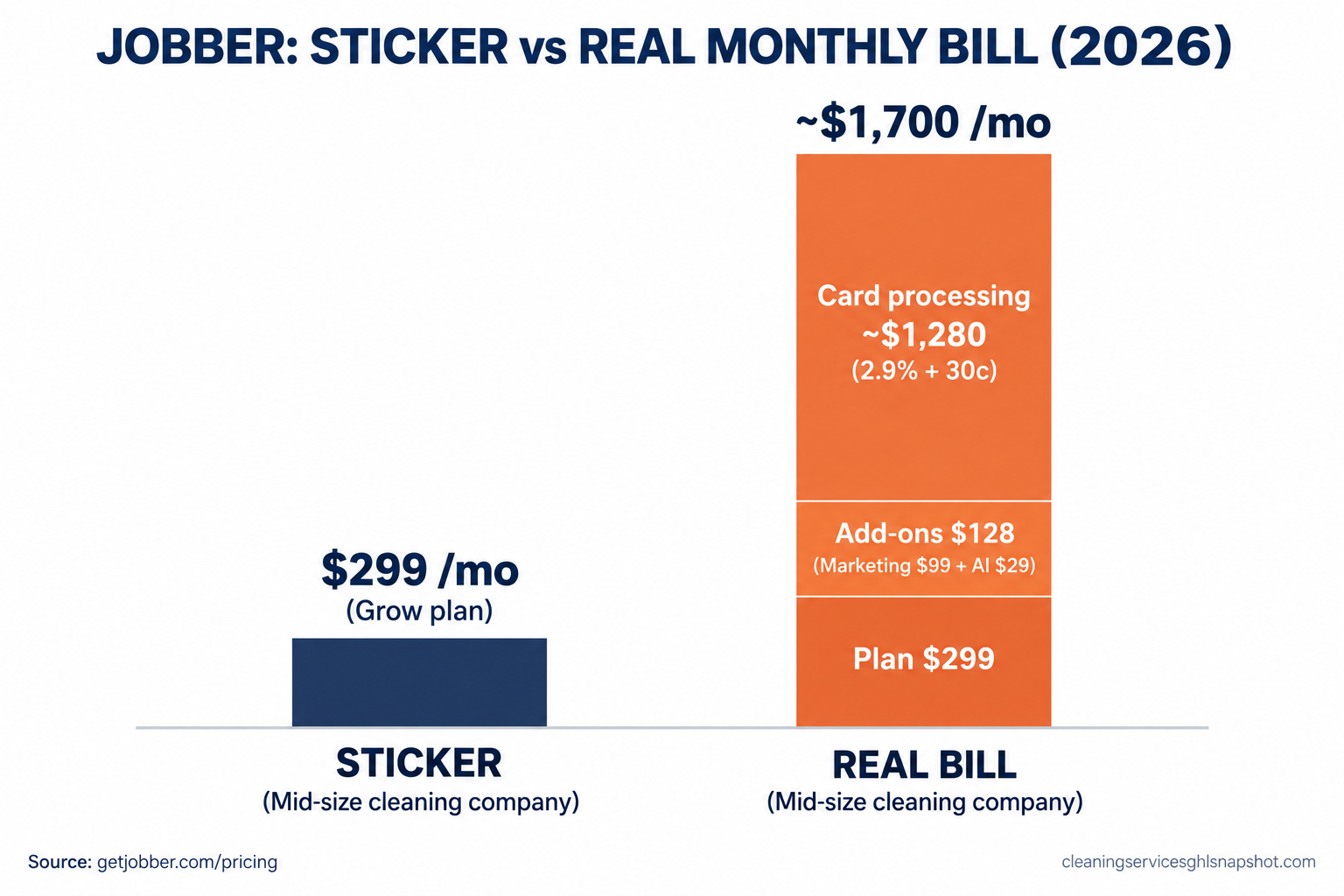
It is the end of the month and you are reconciling the bank. The Jobber line reads what you expected, say $229 for your Grow plan. Then you keep scrolling: a few hundred dollars labeled processing, a Marketing Suite charge you switched on in the spring, an extra seat from the cleaner you hired in August. The $229 app is not a $229 app. Here is where the money actually goes before you commit.
Sources: employment and wage, BLS OEWS, May 2025 (median $17.07/hr, about $35,510/yr at full time); business count, IBISWorld; card rate, Jobber pricing page. All plan prices below are the published figures on that page at time of writing; confirm the live number before you buy.
Key Takeaways
- Four plans are public: Core from $49, then Connect, Grow, and Plus scaling past $500 a month. The trap is not a hidden sticker; it is which features sit behind which tier.
- Core is a decoy for most cleaning shops. It only quotes and invoices, so booking, reminders, follow-up, and marketing push you onto Grow, Plus, or paid add-ons.
- Seats scale by band, then by $29. Each plan is priced for a user count, and each cleaner past the band is $29 a month on top.
- The money features are add-ons. Marketing Suite $99, Sales Pipeline $49, AI Receptionist $29, stacked on whatever plan you pay for.
- Card processing is usually the biggest line. At 2.9% + 30 cents, taking payments in Jobber costs most shops more than the subscription itself.
Table of contents
- What Jobber actually publishes
- Hidden cost 1: the tier ladder pushes you up
- Hidden cost 2: per-user bands and the $29 seat
- Hidden cost 3: the add-ons that win customers
- Hidden cost 4: card processing on every dollar
- Hidden cost 5: the annual lock-in and the promo
- What it actually costs: solo, mid-size, large
- Steal this: the questions that surface the real bill
- The flat, seat-free alternative
- Common objections
- Frequently asked questions
What Jobber actually publishes
Credit where it is due: Jobber puts its tiers on the page, unlike the enterprise tools that make you book a demo to learn the price. Here is what the pricing page shows in 2026, cross-checked against teardowns at Fullcollar and Baadigi. Jobber prices by a user band inside each plan, not a flat per-seat rate, so the number depends on both the tier and how many people are on it. These are the annual, billed-annually rates after the intro promo ends.
| Plan | 1 user | 5 users | 10 users | 15 users | What it adds |
|---|---|---|---|---|---|
| Core | $29 | n/a | n/a | n/a | Quoting, scheduling, invoicing for a solo |
| Connect | $99 | $149 | $229 | $299 | Online booking, reminders, two-way texting |
| Grow | $149 | $229 | $299 | $399 | Quote add-ons, routing, more automation |
| Plus | n/a | $399 | $449 | $529 | Marketing Suite and Pipeline bundled in |
Month to month with no commitment, the same plans run higher: Core $49, and the rest each sit roughly $50 to $170 above their annual numbers. The bill parts ways with the sticker the moment your shop looks like a real cleaning company: more than one person, taking card payments, wanting the tools that book and keep customers rather than just invoice. That happens in five places.
Hidden cost 1: the tier ladder pushes you up
This one catches cleaning owners, because the cheapest plan is built to be outgrown fast. Core at $49 (or $29 annual) looks like the obvious starting point, and for a true solo who only quotes and invoices, it is fine. But Core has no online booking, no automated reminders, and no two-way texting, which for a cleaning business is how you stop phone tag and no-shows. So the moment you want a booking link, you are on Connect. The moment you want quote follow-up and routing, you are on Grow. The marketing tools that generate repeat work sit in Plus or the add-ons.
So the real entry price for a shop that wants the software to help fill the calendar is not $49. It is Connect or Grow, $149 and $229 a month at five users. The cheap tier is a doorway, not a destination.
Monthly Jobber subscription by plan and user band, annual billing (billed-annually rate). Source: Jobber pricing page. Add-ons and card processing stack on top.
Hidden cost 2: per-user bands and the $29 seat
Jobber’s user count is a band with a ceiling, not an unlimited bucket, and that is easy to miss when you are hiring. Each plan lists a price for 1, 5, 10, or 15 users, and every user past your band is $29 a month. Count your real headcount: you, an office dispatcher, and the cleaners who need the app. A five-person band fills up fast. A residential shop with two crews of three plus you and a coordinator is eight people, so you are paying the 10-user band rate.
Grow at the 10-user band is $299 a month annual; scale to 15 and you are at $399, and past 15 Jobber moves you to a “contact sales” conversation, so the price leaves the page. For a janitorial operation running night crews, where headcount climbs faster than ticket size, that per-user model taxes exactly the growth you are trying to fund. Almost every tool charges for seats somehow, so the job is to count it. But Jobber’s band structure means one new hire can bump you a whole tier, not just add a $29 line, so the jump is lumpier than it looks.
Hidden cost 3: the add-ons that win customers
Here is where “they publish their prices” stops being the whole truth. The plan prices are public; the features most likely to grow a cleaning business are sold on top.
The pricing page lists three paid add-ons: the Marketing Suite at $99 a month, the Sales Pipeline at $49, and the AI Receptionist at $29. These are not obscure extras. The Marketing Suite holds the email, referral, and review tools that turn a one-time deep clean into a recurring client. The Pipeline is how you chase quotes so they do not die in a text thread. The AI Receptionist answers the calls you miss while up a ladder, for most shops the most expensive leak in the business. Independent reviews report the $29 AI tier includes about 30 conversations a month, then $0.79 per extra.
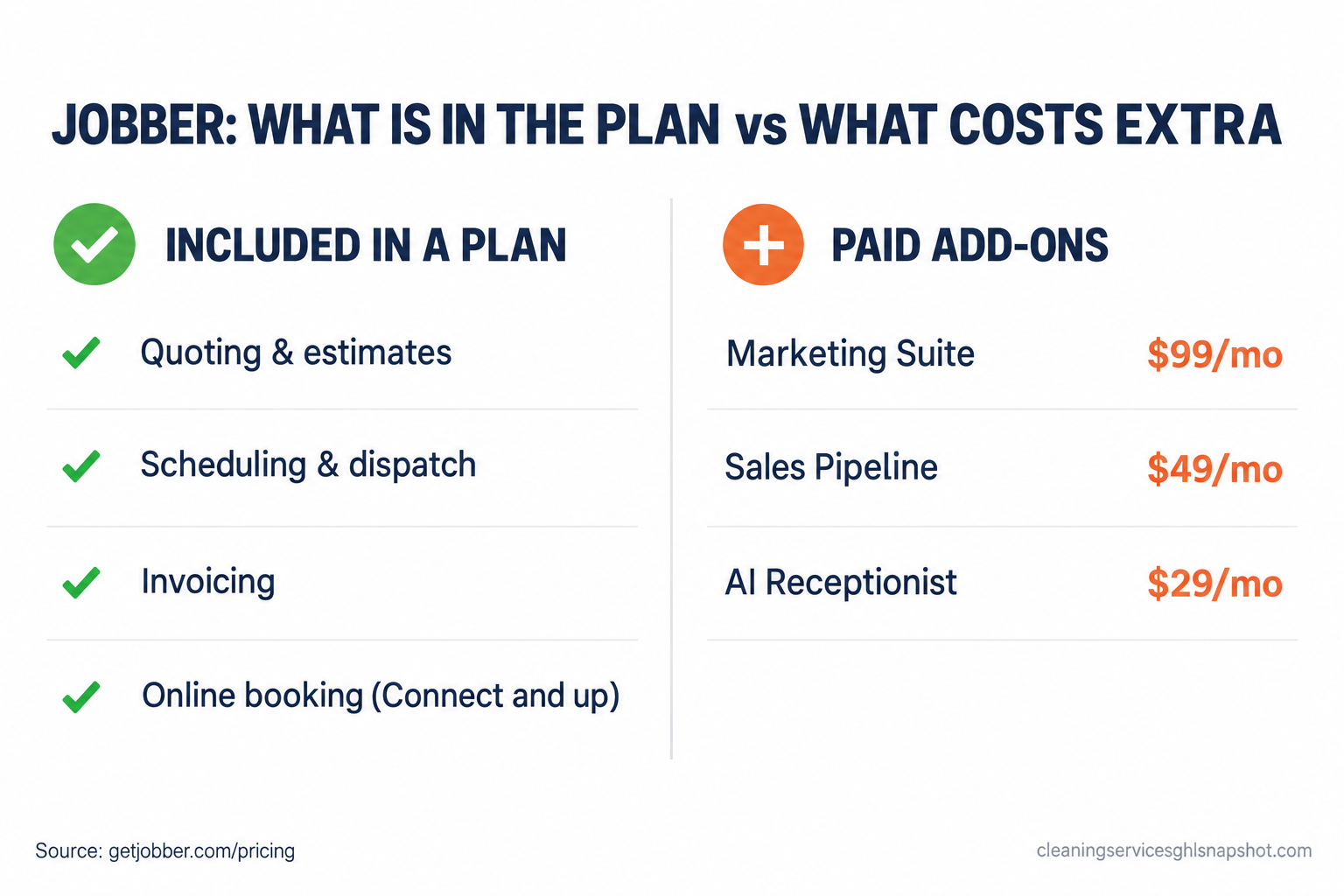
Add all three to a Grow plan and you have put $177 a month on top of your subscription, which can nearly double the bill. Plus bundles the Marketing Suite and Pipeline in, so at scale the jump to Plus can be the cheaper route, a calculation you run per shop that is not on the comparison chart. If your reason for buying is “stop losing leads and no-shows,” price those add-ons, not just the base plan, then compare that true number against a platform where lead capture, texting, and follow-up are in the flat price. The full-market view is in what cleaning software actually costs in 2026.
Hidden cost 4: card processing on every dollar
For most cleaning companies this is the single biggest Jobber cost, and the one owners discount because it does not read as a “subscription.”
Jobber Payments charges 2.9% plus 30 cents on a standard credit card, 2.7% plus 30 cents on Tap to Pay in person, and 1% on bank (ACH) payments, plus a 1% fee for an instant payout. That sounds small until you run it against real volume. Take a shop collecting $40,000 a month, most of it on cards. At 2.9% plus 30 cents across roughly 400 transactions, that is about $1,280 a month in processing. That line dwarfs a $229 or $399 subscription, yet it never shows up in the plan comparison, because it is filed as a payment cost, not a software cost. You would pay card fees with almost any provider, so the task is to count it, not pretend it away. But ACH at 1% is far cheaper than card at 2.9%, so steering recurring clients onto bank payments is one of your few real levers. The mechanics are in how to get cleaning clients to pay automatically.
Hidden cost 5: the annual lock-in and the promo
The headline prices are the annual, billed-annually numbers, and Jobber bills that full year up front. The page also runs a “save up to 40%” promo for new customers, which lowers the first few months but does nothing to the rate once it ends.
That sets up a bind. Go annual and you save, but you have committed a full year, paid in advance, to a tool you have used for one day, and Jobber’s terms state the annual payment is non-refundable if you cancel. So do not sign annual on day one. Run month to month long enough to see the whole bill at your real crew size, volume, and add-ons, then convert only once the tool has earned its full cost.
What it actually costs: solo, mid-size, large
The sticker is the same for everyone; the real bill is not, because seats, add-ons, and processing all scale. Here are three honest profiles at the published annual rates.
Solo operator (you, maybe a part-time helper). Plan: Core at $29 annual if you only invoice, or Connect at $99 the moment you want a booking link and reminders. Processing: $8,000 a month on cards is roughly $250. Real monthly cost: about $280 to $350 all-in, where the plan price is a rounding error next to processing, so your lever is payment mix.
Mid-size (six to eight cleaners). Plan: realistically Grow at the 10-user band, $299, because eight people plus an office seat blows past the 5-user band. Add the Marketing Suite and AI Receptionist to chase leads, $128 more. Processing: $40,000 a month on cards is roughly $1,280. Real monthly cost: around $1,700 against a $299 sticker, and this is the band where Plus can pencil out better than Grow plus add-ons.
Large (15-plus, residential or janitorial). Plan: Plus at the 15-user band, $529, and past 15 users you are into “contact sales.” Processing scales hard: $100,000 a month on cards is roughly $3,000 in fees alone. Real monthly cost: comfortably $3,500-plus, of which the subscription is well under 20%, and the per-user band works against you every time you add a crew. (Illustrative; your number varies with team size, payment mix, and add-ons.)
Disclosure: the GoHighLevel link above is an affiliate link. If you start a plan through it we may earn a commission, at no extra cost to you. We only recommend tools we build on ourselves.
Steal this: the questions that surface the real bill
Ask the questions that surface the rest of the bill, and get a number in writing for each before you commit.
The tier question. “I want a booking link, reminders, quote follow-up, and marketing. Which plan includes all of that at my crew size, or do I need add-ons on top?” Make them map features to the tier, not quote the base plan.
The seat question. “I have X people today and expect Y in twelve months. What band does Y put me in, and what is my total there, including every $29 seat?” Make them do the twelve-month math.
The add-on question. “I want the Marketing Suite, Pipeline, and AI Receptionist. What does each cost on my plan, what is the AI conversation cap, and is any bundled in Plus?”
The processing question. “What is my exact card rate, Tap to Pay rate, and ACH rate? I process about $Z a month, so what is that in dollars?”
Fill in the worksheet with their answers, so you compare a real number, not a sticker.
The deeper version of the processing and labor math for your own shop is in what a cleaning job actually costs you.
The flat, seat-free alternative
The structural issue is not any single fee. It is the shape: you pay more as you climb the tier ladder, more as you hire (seats), more as you add the features that help (add-ons), and more as you sell (processing). Every axis of growth is also an axis of cost, and a flat, seat-free platform inverts that. GoHighLevel charges a flat rate (Starter around $97, Unlimited around $297) with no per-user fee, and lead capture, two-way SMS, online booking, pipelines, and reviews are included rather than sold as add-ons. For a mid-size shop running Grow plus $128 in add-ons, that math compounds fast. We compare them in GoHighLevel vs Jobber and Jobber vs Housecall Pro.
The catch with any flat platform is that flexible power means setup work. And whatever tool you text from, US business SMS at volume needs A2P 10DLC registration and consent, covered in TCPA and 10DLC for cleaners. If you want the flat-price platform without building the pipelines, booking, and SMS by hand, that is what our pre-built system installs for you.
Common objections
“Isn’t Jobber worth it for how polished it is?” For plenty of shops, yes. It is genuinely easy to use and well built, and if you need its field-service workflow and the whole bill pencils out, it is a capable tool. The problem is not the software; it is that owners compare the $49 or $229 sticker to an alternative’s real price and conclude Jobber is cheaper, when the honest comparison is real-to-real. Do that and the gap often closes or flips.
“I already pay card fees somewhere, so does the rate matter?” It matters because the rate and the payment mix are both levers you control. Steering recurring clients from card at 2.9% to ACH at 1% on $40,000 a month saves well over $700 a month on the same revenue. Those dollars are real, and most shops leave them on the table.
“Do I need to be technical to switch off Jobber later?” No, but you need a plan so you do not lose your calendar. Export your client list and recurring schedule, rebuild the recurring jobs in the new tool first, test the new booking link before you announce anything, and keep Jobber read-only for 30 days. The only way to lose bookings is flipping the public link before the new calendar is tested, a sequence in ZenMaid alternatives.
Frequently asked questions
How much does Jobber really cost per month for a cleaning business?
Plans run $49 (Core, 1 user) up to about $529 (Plus, 15 users) annual, but that is just the subscription. A real six-to-eight-cleaner shop is typically on Grow ($299) plus around $128 in add-ons plus roughly $1,000+ in monthly card processing on $40,000 of volume, landing near $1,700 all-in. The sticker is often under a quarter of the true bill once processing is counted.
Does Jobber have hidden fees?
The four plan prices are public, but the rest of the bill is less obvious: Jobber prices by user band so an extra cleaner can bump you a whole tier, each seat past your band is $29 a month, the Marketing Suite ($99), Sales Pipeline ($49) and AI Receptionist ($29) are paid add-ons, and Jobber Payments takes 2.9% + 30 cents on every card. Those stacked costs usually exceed the subscription.
What are Jobber's payment processing fees?
Jobber Payments charges 2.9% + 30 cents on a credit card, 2.7% + 30 cents on in-person Tap to Pay, and 1% on bank (ACH) payments, plus a 1% instant-payout fee. On real volume this is usually the single biggest line of the bill, so steering recurring clients to ACH is the main lever for lowering it.
How much are extra users on Jobber?
Every plan charges $29 a month per user beyond your band. Because plans are priced in bands (1, 5, 10, 15 users), adding a cleaner can add a $29 line or bump you to the next band. Past 15 users, Jobber moves you to a 'contact sales' quote, so the price is no longer published.
Is the AI receptionist included in Jobber's price?
No. It is a paid add-on at $29 a month, which independent reviews say includes about 30 conversations a month then roughly $0.79 per extra. The Marketing Suite ($99) and Sales Pipeline ($49) are likewise add-ons, though Plus bundles the marketing tools in.
What is a cheaper alternative to Jobber for cleaning companies?
Flat, seat-free platforms like GoHighLevel (around $97 to $297 a month, no per-user fee) often win the real-to-real comparison for growing shops, because lead capture, SMS, booking, pipelines and reviews are included rather than sold as add-ons. The trade is setup work. Compare your true all-in Jobber number, not the sticker, before deciding.