
Here is the short version. Jobber and Housecall Pro are the two biggest field-service platforms cleaning owners compare. They cost about the same and are built for slightly different shops. Pick Jobber for a small-to-mid residential crew that drives multi-stop routes and wants the lower entry price and native route optimization. Pick Housecall Pro for a larger or commercial operation that wants built-in marketing, deep QuickBooks sync, and photo-and-checklist quality control. Neither sticker is the real price: both meter texting, charge per cleaner above a limit, and take a cut of every card payment. Below is the honest 2026 breakdown and the real cost at three sizes.
I run a small GoHighLevel agency, and cleaning companies are most of my book. Before an owner asks me about automation, they ask which of these two to buy. Every price below is from the vendor’s own pricing page, linked, and every stat is sourced.
Sources: employment and wage, BLS OEWS, May 2025; market size and business count, IBISWorld market size (2026) and IBISWorld business count (2026).
Key Takeaways
- They are priced within spitting distance. Jobber starts lower on paper, Housecall Pro bundles more, and for a five-cleaner shop the monthly gap is usually smaller than the add-ons you switch on.
- The trap is different on each. Jobber’s is add-ons (marketing, pipeline, AI receptionist all cost extra). Housecall Pro’s is per-user fees above your seat limit, plus a card rate you never negotiate.
- Jobber leans residential and route-heavy. Native route optimization and a lower entry price fit a maid crew hopping between homes.
- Housecall Pro leans marketing and quality control. Built-in reviews, GPS, photo reports, and checklists fit a larger or commercial operation.
- Neither fills your schedule. Both run the jobs you already have well. Getting the phone to ring is still on you.
Table of contents
- The short answer: which one fits your shop
- Pricing: what each one actually costs in 2026
- Per-user fees: the cost that grows as you hire
- Card processing: the biggest bill nobody compares
- Add-ons: where Jobber’s sticker unravels
- Scheduling, dispatch, routing, and recurring jobs
- Photos, checklists, and quality control
- Getting more jobs: booking, reviews, marketing
- The real cost at three business sizes
- How each one breaks (and what to do)
- Steal this: the texts either tool should send
- The SMS you turn on has a compliance cost
- Common objections, answered straight
- Frequently asked questions
The short answer: which one fits your shop
Both do the same core loop: online booking, drag-and-drop scheduling, recurring visits, estimates that become invoices, card and ACH payments, and a crew app. The differences are at the edges, and for a cleaning business the edges decide it.
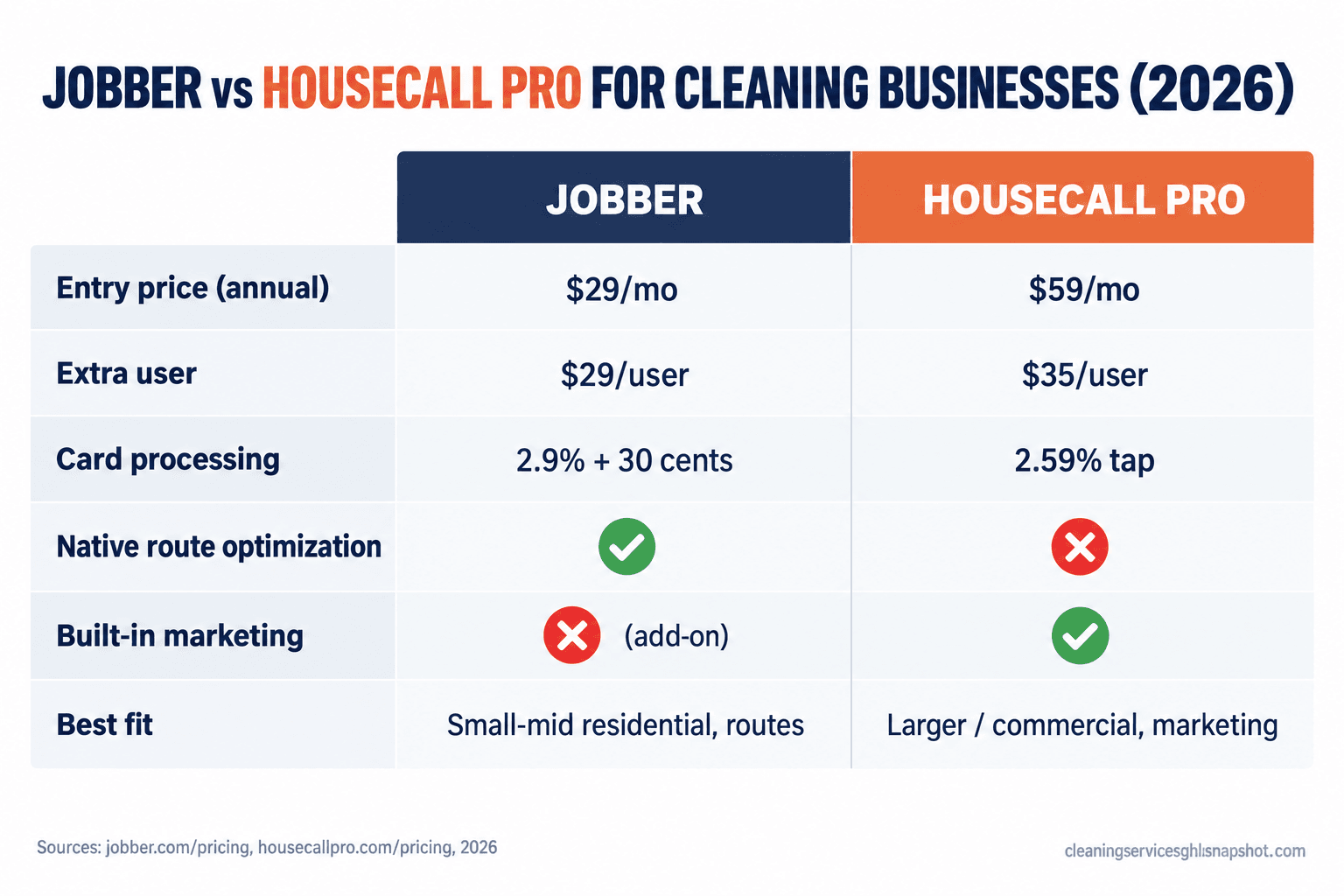
| Criteria | Jobber | Housecall Pro |
|---|---|---|
| Entry price (annual billing) | ~$29/mo (Core, 1 user) | ~$59/mo (Basic, 1 user) |
| Mid plan for a small team | Connect, ~$119/mo (5 users) | Essentials, ~$149/mo (5 users) |
| Extra user | ~$29/user/mo | ~$35/user/mo |
| Card processing (card present) | 2.9% + 30¢ | 2.59% |
| Native route optimization | Yes, built in | Via integrations |
| Built-in marketing tools | Add-on (Marketing Suite) | Included from Essentials |
| Best fit | Small-mid residential, route-heavy | Larger or commercial, marketing-heavy |
Prices from Jobber pricing and Housecall Pro pricing (annual-billing rates, September 2026); processing rates from Housecall Pro’s payment help page. Confirm live before you buy; Jobber restructured plans in 2026.
Pricing: what each one actually costs in 2026
Start with the published numbers, then we adjust for reality.
Jobber runs four tiers. On annual billing, Core is roughly $29/mo (one user), Connect around $119/mo (five users), Grow from about $149/mo (ten users), and Plus about $529/mo (fifteen users). Month-to-month is materially higher, with Core at $49 and the top tier near $699 (Jobber pricing; tier detail from independent 2026 breakdowns). Jobber reshuffled these plans during 2026, so the middle numbers move. Check the live page the day you buy.
Housecall Pro runs three tiers on annual billing: Basic at $59/mo (one user), Essentials at $149/mo (up to five users), and MAX at $299/mo. Month-to-month is $79, $189, and $329 (Housecall Pro pricing). Most growing companies land on Essentials; Basic’s single seat is useless the day you hire your first cleaner.
On the base plan for a five-person shop, it is roughly Jobber Connect at $119 against Housecall Pro Essentials at $149. Jobber is cheaper on the sticker, but add-ons and per-user math flip it fast.
Base plan monthly cost for a five-user shop, annual billing, 2026, before add-ons, extra users, texting, or card processing. Sources: Jobber, Housecall Pro.
Per-user fees: the cost that grows as you hire
This is the most important line for a cleaning business, because your headcount only goes one way and both tools charge for it. Above a plan’s included seats, Jobber adds about $29 per user per month and Housecall Pro about $35 (Jobber pricing, Housecall Pro pricing). Add four cleaners over your Housecall Pro limit and that is $140 a month, $1,680 a year on top of the subscription, and it climbs every time you hire.
Jobber’s per-seat cost is a touch lower, but its plans include fewer users at each tier, so you climb tiers sooner. Count the crew you expect in twelve months, not today, and price both against that number. The tool that punishes hiring least wins this round.
Card processing: the biggest bill nobody compares
Owners argue for an hour over a $30 plan difference and never ask about the card rate, which on a busy shop is the largest software cost they have. Jobber Payments charges about 2.9% plus 30¢ per card transaction, with ACH around 1% (Jobber Payments basics). Housecall Pro’s rates are tiered: roughly 2.59% for a tapped payment, 2.99% for an online invoice, and 3.49% for a keyed card or Amex, with ACH at 1% (Housecall Pro payment options).
Card processing rate per transaction, 2026 (Jobber adds a flat 30¢ on top). Sources: Jobber, Housecall Pro.
A shop running $40,000 a month in card payments pays north of $1,000 a month in processing, which dwarfs any plan difference. The rate matters more than the tier, and most owners never look at it.
Add-ons: where Jobber’s sticker unravels
Jobber’s low entry price has a catch: the growth tools are separate paid layers. Jobber sells a Marketing Suite (around $99/mo), a lead Pipeline (around $49/mo), and an AI Receptionist (around $29/mo) as add-ons on top of your plan (Jobber pricing breakdown, 2026). Turn on the review requests and follow-up most owners want, and a $29 Core plan quietly passes $150 a month.
Housecall Pro takes the opposite approach: automated review requests, email and postcard marketing, and a customer portal are built into Essentials and up. It has its own paid add-ons (an AI call assistant, a sales proposal tool, payroll), but the core marketing loop is included where Jobber’s is a la carte. If you plan to lean on the software for follow-up and reviews, Housecall Pro’s bundle can beat Jobber base plus the Marketing Suite. Our GoHighLevel vs Jobber breakdown and GoHighLevel vs Housecall Pro comparison go deeper on each tool’s marketing gaps.
Scheduling, dispatch, and routing
Both nail the basics: a drag-and-drop calendar, crew assignment, job reminders, and recurring weekly and biweekly cleans, which are the whole game for a residential shop. The difference that matters is routing. Jobber has route optimization built in, so you can order a day’s stops to cut drive time without a second tool. For a maid crew doing six to eight homes a day, that is real money in fuel and hours. Housecall Pro leans on third-party integrations for heavy routing, so it is one more thing to wire up, though it counters with a stronger customer portal (Housecall Pro vs Jobber comparison). If drive time is a top-three cost, and for most residential crews it is, Jobber has the edge. Our route optimization guide breaks the math down, and the recurring revenue playbook covers the follow-up that turns one-off cleans into standing appointments.
Photos, checklists, and quality control
For commercial and janitorial work, and for any residential shop burned by a “you missed the baseboards” complaint, photo proof is not optional. Housecall Pro is the stronger tool here. Its mobile app emphasizes GPS tracking, custom job checklists, and photo reports, so a crew can document a finished job and you have proof if a client disputes it (Housecall Pro vs Jobber comparison). Jobber supports job photos and notes too, but the checklist and quality-control workflow is less of a headline feature. If you run commercial contracts where documentation is part of the deal, or manage crews you cannot personally inspect, that photo-and-checklist story is worth the higher entry price on its own.
Getting more jobs: booking, reviews, marketing
Here is the part both vendor sites gloss over: neither tool is a lead machine. Both offer an online booking form and both send automated review requests after a job (built in on Housecall Pro, via the Marketing Suite add-on on Jobber), so if more reviews is the goal, Housecall Pro does more out of the box. But if your real problem is leads slipping through, the phone ringing while you are up a ladder and the caller booking whoever answers first, no field-service tool fully solves that. Speed is everything: Harvard Business Review found firms that responded to an online lead within an hour were nearly seven times more likely to have a real conversation with a decision-maker than those that waited longer (HBR, 2011). That instant response is where a purpose-built system beats a scheduling app. See the missed-call text-back playbook.
The real cost at three business sizes
There is no single winner, because the math changes as you grow. Here is a rough all-in for three shapes of cleaning business, from the published prices above. Card processing is not included, since it depends on your volume.
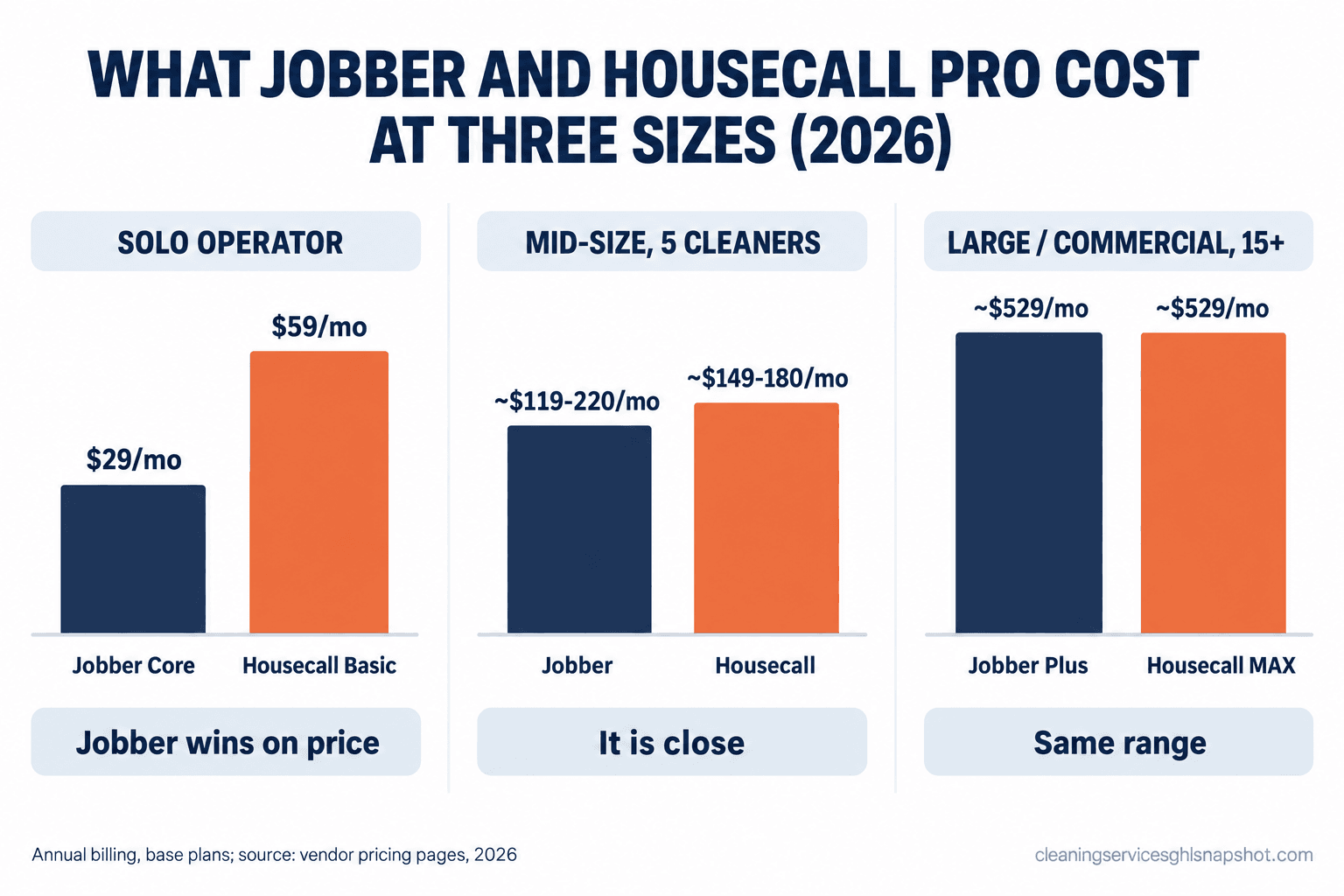
Solo (you, maybe one helper, 30 to 60 jobs a month). You need one or two seats, not a marketing suite. Jobber Core at ~$29/mo annual is the cheapest way in. Housecall Pro Basic at $59 buys the stronger app and photo tools. For most true solos, Jobber wins on price.
Mid-size (three to six cleaners, 150 to 300 jobs a month). This is where it gets close. Jobber Connect at ~$119 covers five users, but add the Marketing Suite and you are near $220. Housecall Pro Essentials at ~$149 includes five users and bundles that marketing, landing around $149 to $180 for the same setup. The cheaper sticker can cost more once the growth tools are on. Decide on features, not the headline.
Large or commercial (15+ people, bid contracts, night crews). Per-user pricing dominates and you need the top tier for reporting anyway. Jobber Plus (fifteen users) is about $529 annual; Housecall Pro MAX plus per-user fees climbs into the same range. Keep the proportion in mind: at the BLS May 2025 median of $17.71 an hour for janitors and building cleaners (BLS), one crew’s wages for a week dwarf either subscription for a month. Optimize for admin hours saved and photo proof.
How each one breaks (and what to do)
Here are the failure modes I see owners hit, and how to get ahead of them.
Jobber breaks when you buy Core on the sticker. Owners sign up at $29, then find the reviews and follow-up they wanted live behind two add-ons, and the bill triples. Fix: price the plan plus the add-ons you will actually use, and treat the Marketing Suite as part of the base cost.
Housecall Pro breaks on the per-user creep. Essentials feels cheap at five users, then you hire a sixth, seventh, and eighth cleaner and each adds $35 a month you did not budget. Fix: forecast headcount twelve months out and check it against MAX before you settle on Essentials.
Both break as a growth tool. The disappointment I hear most is “I bought this to get more clients and my schedule is still not full.” That is the wrong tool for the job, not a broken one; getting the phone to ring is a separate system.
Both break at migration. Moving your customer list, job history, and recurring schedules is a real project, not an afternoon. Fix: export cleanly, import in a quiet week, and run both systems in parallel for one cycle. Our migration guide walks the steps.
Steal this: the texts either tool should send
Whichever platform you run, the money is in the messages. Copy these four and load them into your reminders and follow-up.
Missed-call text-back (send within 60 seconds of a missed call):
Hi, this is [Name] with [Company]. Sorry we missed your call! We were probably mid-clean. Are you looking for a quote or to book a cleaning? Reply here and I will get you sorted in a couple of minutes.
Appointment reminder (send the evening before):
Reminder: your cleaning with [Company] is tomorrow, [Day], between [window]. Reply C to confirm or R to reschedule. Please make sure we can access the home and any pets are secured.
Review request (send 2 to 3 hours after the job is marked complete):
Hi [First name], thanks for having [Company] out today. If the home looks great, would you leave us a quick review? It takes 20 seconds and it genuinely helps our small business: [review link]
Recurring rebook nudge (send after a one-off clean):
Hi [First name], loved having your home on our list today. Most clients keep it feeling this way with a biweekly visit, and I can hold your same crew and slot. Want me to set that up? First recurring clean is [offer].
The SMS you turn on has a compliance cost
One cost lives underneath every “texting” feature. In the US, business texting runs over A2P 10DLC (application-to-person, 10-digit long code): your number and campaign have to be registered with the carriers, and a small registration and monthly carrier fee rides on top of whatever the software charges (The Campaign Registry). Skip it and your texts get filtered or blocked, so the reminders you pay for do not land. And texting customers who never agreed to hear from you is a problem under the Telephone Consumer Protection Act, which the FCC has been tightening (FCC). On either platform, confirm the texting is registered and that you capture consent at booking. We cover the operator’s side in the cleaning-business TCPA guide.
Common objections, answered straight
“They cost about the same, so does it matter which I pick?” It matters at the edges, and the edges are your daily reality. Drive time and a low entry price point to Jobber. Photo proof, built-in marketing, and QuickBooks depth point to Housecall Pro. Pick on the feature you use every day.
“I already pay for one. Should I switch?” Not on price alone. Switching costs you migration, retraining, and a few weeks of friction. Switch when the tool is costing you jobs, when per-user fees have made it pricier than the alternative, or when you pay for modules you never open. Otherwise stay and fix the gap with a bolt-on.
“Do I need to be technical?” To use it day to day, no. The technical part is setup: connecting texting, registering for A2P 10DLC, building sequences, importing customers. Budget a weekend, or pay someone to build it once. To compare all five major tools instead of just these two, see the full cost breakdown of cleaning software, and the online booking playbook for the booking flow.
The bottom line
Both are good software, and the “wrong” choice is rarely a disaster. Jobber wins for a small-to-mid residential crew that values routing and a low entry price. Housecall Pro wins for a larger or commercial operation that wants built-in marketing, photo proof, and QuickBooks depth. Run the twelve-month all-in for each, including per-user fees and the add-ons you will turn on, and pick on that, not the sticker.
And keep the honest limit in mind: whichever you choose runs your jobs well and does little to fill your calendar. That part, the instant quotes and missed-call text-back, is a separate system worth building either way.
Which is cheaper for a cleaning business, Jobber or Housecall Pro?
On the entry sticker Jobber is cheaper: Core is around $29/mo annual versus Housecall Pro Basic at $59/mo. But the gap narrows or reverses for a real shop. Add the marketing tools most owners want and Jobber's add-ons (Marketing Suite around $99/mo) can push it past Housecall Pro Essentials at $149/mo, which bundles that marketing. Compare the twelve-month all-in, including per-user fees.
Which is better for commercial or janitorial cleaning?
Housecall Pro tends to fit commercial and janitorial work better, thanks to stronger photo reports, GPS tracking, custom job checklists, and deeper QuickBooks sync for contract documentation and quality control. Jobber can do commercial work, but its photo-and-checklist workflow is less of a headline feature.
What does each one charge for card payments?
Jobber Payments charges roughly 2.9% plus 30 cents per card transaction and about 1% for ACH. Housecall Pro is tiered: around 2.59% for a tapped payment, 2.99% for an online invoice, 3.49% for a keyed card or Amex, and 1% for ACH. On a busy shop, processing is usually your largest software cost, so check it before picking a plan.
Do Jobber and Housecall Pro charge extra per cleaner?
Yes, above each plan's included seats: Jobber adds roughly $29 per user per month and Housecall Pro roughly $35. Since crews only grow, forecast headcount twelve months out and price both against that number, not today's team.
Will either tool get me more cleaning clients?
Not on their own. Both are operations platforms that run the jobs you already booked. They offer online booking and review requests, but they do not answer missed calls in seconds or chase leads automatically. Filling an empty calendar is a separate speed-to-lead system on top of your scheduling tool.