If your cleaning business runs GoHighLevel but still copies jobs into Jobber by hand, re-keys invoices into QuickBooks, and chases card payments one text at a time, the platform is doing maybe a third of the work it should. The value of GoHighLevel for a cleaning company isn’t the CRM screen — it’s the integrations underneath it: the connections that let a website lead, a booked job, a paid invoice, and a five-star review all move between systems without a human retyping anything. Get those wired correctly and GHL stops being another login and becomes the hub your whole operation runs through.
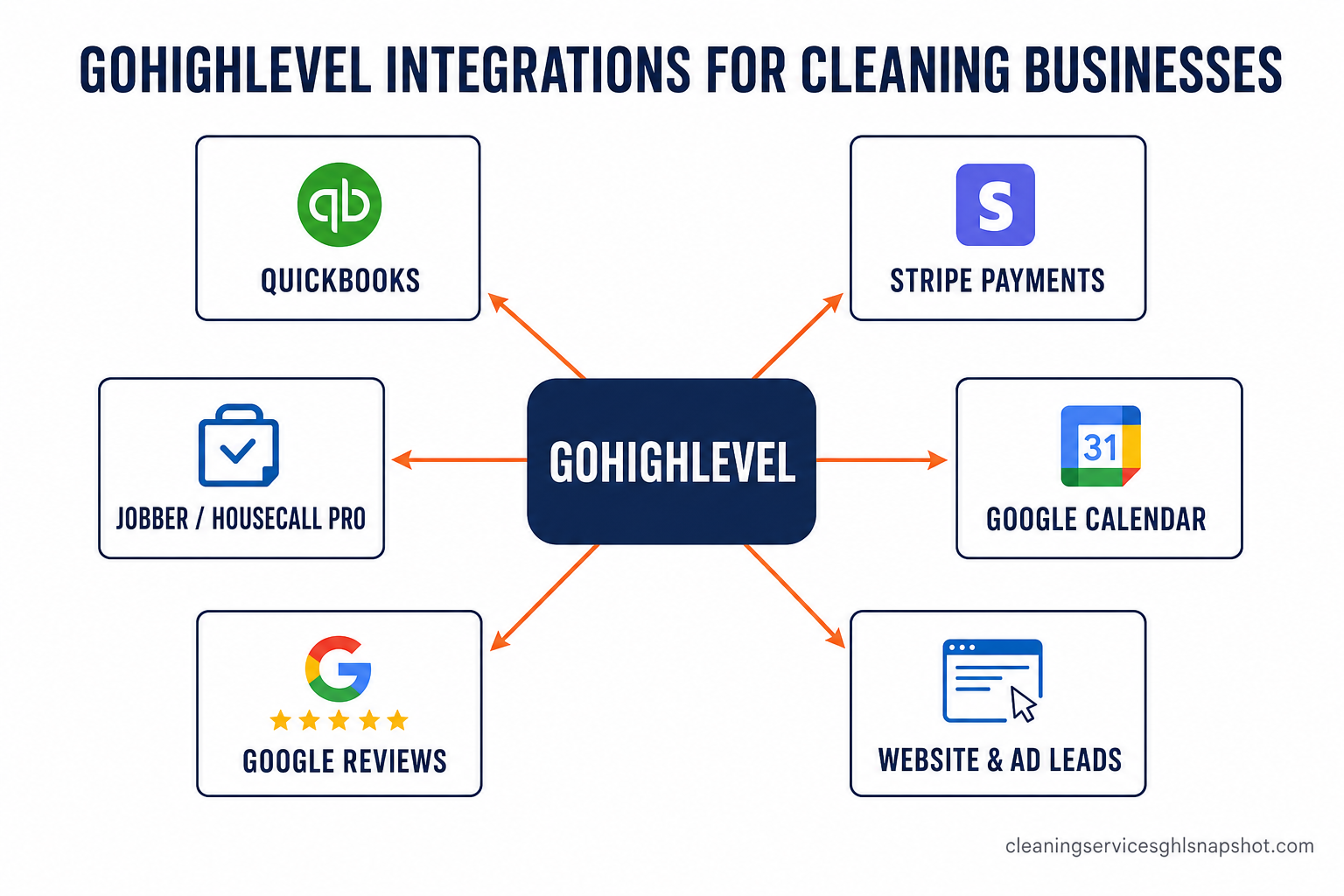
This guide is the practical version: the seven integrations that actually matter for a US cleaning or maid service in 2026, what each one connects, and — because an automation that doesn’t show up in revenue or reclaimed hours isn’t worth building — what each is realistically worth. Every number below is sourced. No invented figures.
Key Takeaways
- Disconnected tools are a silent tax. A 2025 survey found manual data entry costs US companies about $28,500 per employee per year, with employees spending 9+ hours a week transferring data between systems (Parseur survey). Every integration you add is hours you stop paying for twice.
- Speed-to-lead is the highest-ROI integration. Connecting your website and ad lead forms straight into GHL so a new lead gets an instant text matters because contacting a lead within 5 minutes makes them 21× more likely to qualify than waiting 30 minutes (MIT / InsideSales Lead Response study).
- You don’t have to rip out Jobber or Housecall Pro. A two-way integration syncs jobs, contacts, and recurring plans between your field-service software and GHL — no double entry, no “which system is right?” confusion.
- Payments and reviews should be automatic, not chores. Card-on-file recurring billing through Stripe and auto-triggered Google review requests turn two of the most-skipped office tasks into background workflows.
- Native connectors handle the common cases; custom development handles the rest. Where GHL can’t natively talk to a tool, a webhook or API bridge can — a field-service ↔ GHL connector is a $3K–$5K fixed-price build (GHL Development).
Table of contents
- Why disconnected tools quietly bleed a cleaning business
- What an “integration” actually means in GoHighLevel
- The 7 GoHighLevel integrations every cleaning business needs
- Native connector vs custom integration: when to use each
- How to roll integrations out without breaking your calendar
- What it costs to build the ones GHL can’t do natively
- Frequently asked questions
Why disconnected tools quietly bleed a cleaning business
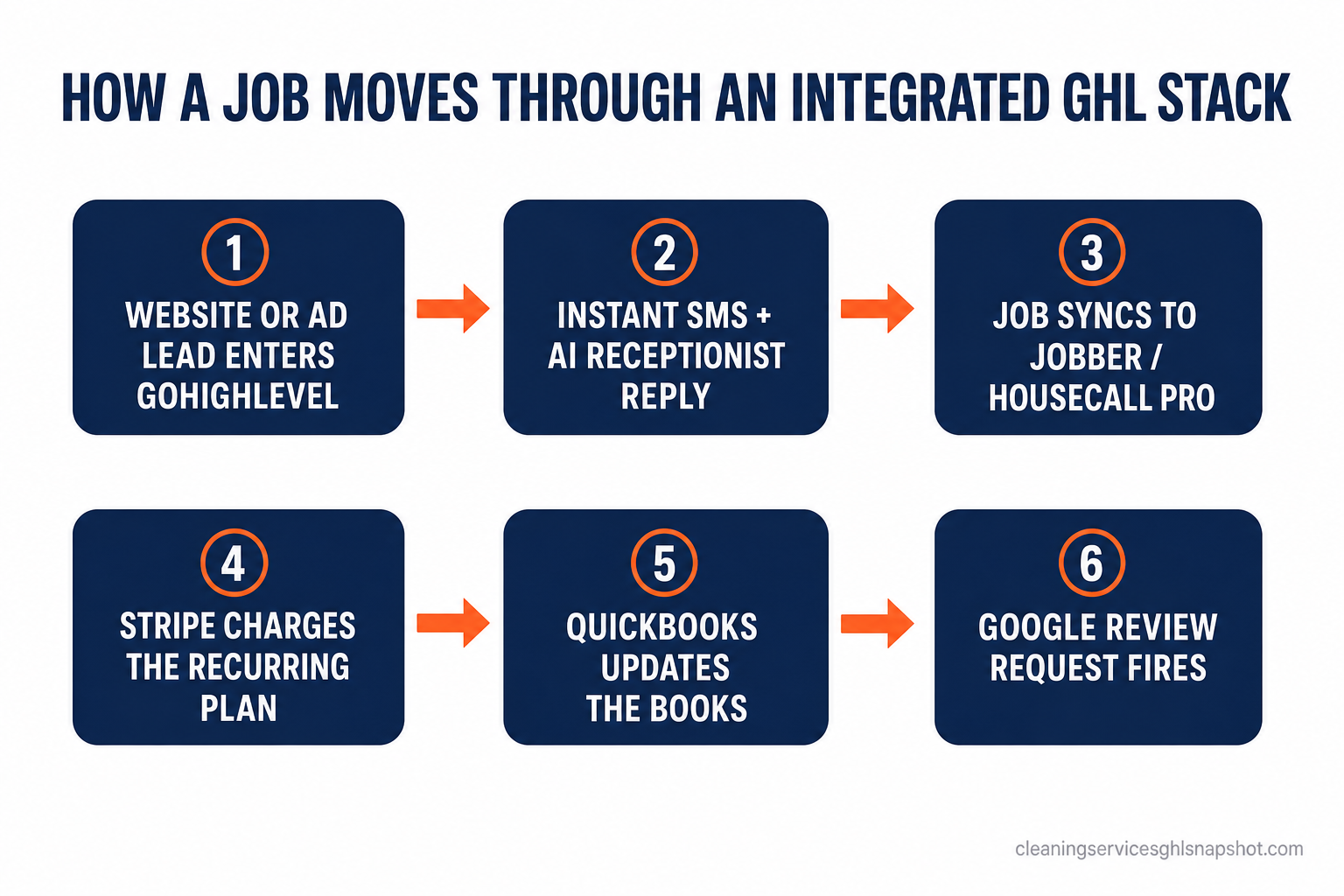
The US janitorial and cleaning services industry was worth about $110 billion in 2025 across more than 1.2 million businesses (IBISWorld). Most of those operators run lean — an owner, a dispatcher or office manager, and crews. In a business that thin, the office manager is the integration. When a lead comes in through the website, someone copies it into the CRM. When a job books, someone types it into Jobber. When it’s done, someone builds the invoice in QuickBooks and texts for payment. When the customer’s happy, someone remembers — or forgets — to ask for a review.
That manual glue is expensive in a way that never shows up on a single invoice. A 2025 survey reported that manual data entry costs American companies an average of $28,500 per employee each year, with respondents spending more than nine hours a week just moving data from one place to another (Parseur). Separately, Smartsheet found that over 40% of workers spend at least a quarter of their week on manual, repetitive tasks, and nearly 60% believe automating those tasks would save them six or more hours a week — close to a full workday (Smartsheet).
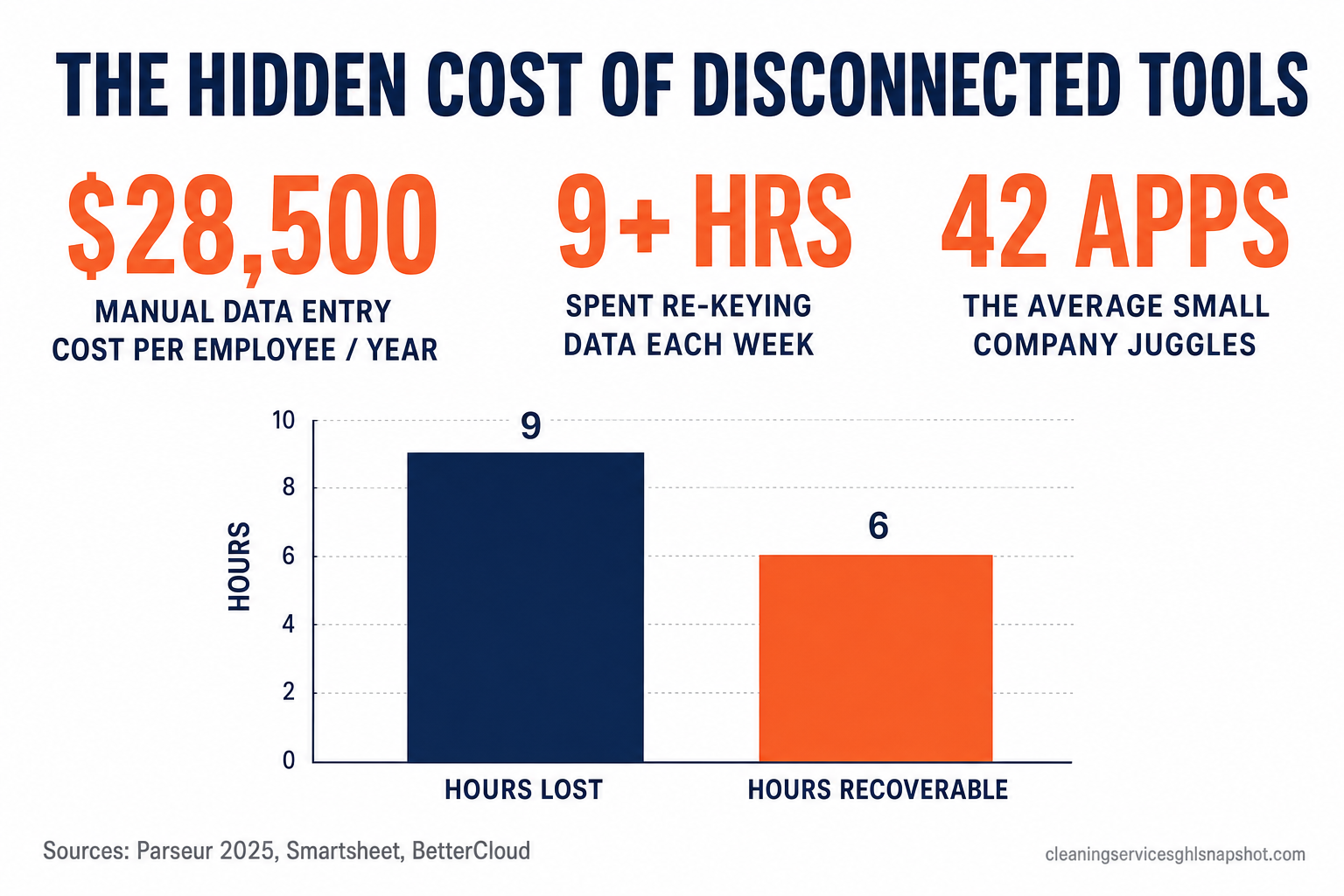
It compounds because there are so many tools to keep in sync. Companies with fewer than 200 employees use an average of 42 SaaS applications, and a majority of those apps get adopted without any central plan for how they’ll talk to each other (BetterCloud). A cleaning business rarely runs 42, but it’s easily running eight to twelve: a booking tool, GHL, a field-service app, QuickBooks, Stripe, Google Calendar, Google Business Profile, a phone system, a review tool, Facebook and Instagram lead ads. Every pair of those that isn’t connected is a place where data gets retyped, dropped, or delayed.
What an “integration” actually means in GoHighLevel
“Integration” gets used loosely, so here’s the practical breakdown for a cleaning operator. In GoHighLevel there are three ways two tools talk to each other:
The skill isn’t knowing the words — it’s knowing which method a given job needs. A new website lead flowing into GHL is native. Pushing a booked GHL job into Jobber and pulling the completed status back is a custom two-way sync. Picking the heaviest tool for a light job wastes money; picking a fragile Zap for a job that needs a real sync breaks quietly and loses records. When you’re not sure, that’s exactly the scoping conversation a GHL developer has before a line of code is written.
The 7 GoHighLevel integrations every cleaning business needs
Ranked by return, not by how impressive they sound. Wire them roughly in this order.
1. Lead sources → GHL (speed-to-lead)
Connect your website quote form, Facebook and Instagram lead ads, Google Local Services, and any “get a quote” widget directly into GoHighLevel so a new lead triggers an instant text and task — not an email someone reads at 5 p.m. This is the single highest-ROI integration you own, because the clock starts the second someone hits submit. Contacting a lead within 5 minutes makes them 21× more likely to qualify than contacting them at 30 minutes, and firms that respond within an hour are 7× more likely to have a meaningful conversation than those that wait even 60 minutes longer (Harvard Business Review / MIT / InsideSales).
Relative odds of qualifying an inbound lead by response time (30-minute response indexed to 1×). Source: MIT / InsideSales Lead Response Management study, via Harvard Business Review. Directional across the studied sample, not a guarantee for any one lead.
For the mechanics of turning that speed into booked cleans, see our playbooks on missed-call text-back and SMS automation.
2. Field-service software ↔ GHL (two-way job sync)
If you already run Jobber, Housecall Pro, ZenMaid, Launch27, or ServiceMonster for scheduling and crews, you don’t have to abandon it to use GHL for marketing and follow-up. A two-way integration keeps contacts, jobs, recurring plans, and pipeline stages matched between the two so nobody re-keys anything: a GHL pipeline stage change creates or updates the job in your field-service app, and completed-job data flows back to trigger review requests and rebooking sequences. This is a custom build — there’s no native “Jobber connector” — but it’s one of the most common cleaning-niche integrations we ship. If you’re weighing whether to keep both or consolidate, read GoHighLevel vs Jobber for cleaning businesses.
3. QuickBooks / accounting (kill the double entry)
The office task everyone hates most is entering the same invoice twice. A QuickBooks integration syncs customers, invoices, and payments between GHL and your books so a paid job in GHL shows up in QuickBooks without anyone touching it. Given that manual data entry is the ~$28,500-per-employee line item above, this is where a lot of that money leaks — and where it stops.
4. Stripe recurring billing (card-on-file)
Recurring cleans should be recurring payments. A Stripe integration lets you store a card on file and auto-charge weekly or bi-weekly plans, which quietly solves your slowest cash problem. It’s a real one: Intuit’s 2025 survey found 56% of US small businesses are carrying unpaid invoices, with the average business owed about $17,500 and 47% reporting invoices overdue by 30 days or more (Intuit QuickBooks 2025 Late Payments Report). Card-on-file billing removes the “did they pay yet?” chase entirely. Pair it with a recovery flow for the failures; here’s our payment recovery playbook.
5. Google Calendar & booking (one source of truth)
Sync GHL’s booking calendar with the Google Calendar your crews already live in so self-booked jobs, reschedules, and cancellations update in one place. This is native, fast to set up, and it’s the difference between a customer self-booking a real open slot and someone double-booking a Saturday crew. It also feeds the appointment automation that sends reminders and recovers no-shows.
6. Google Business Profile & reviews (reputation on autopilot)
Connect Google Business Profile so review requests fire automatically after a completed clean and new reviews surface where you can respond. Reviews are the local-search flywheel for cleaners, and a triggered request beats “remembering to ask” every time. Our Google reviews guide and review harvesting feature cover the timing that actually earns five stars.
7. Phone, call tracking & AI receptionist
Route your business number through GHL for call tracking, recorded conversations tied to the contact record, and — for the calls no one can answer mid-clean — an AI receptionist that books straight into the calendar. Missed calls are missed jobs; capturing them inside the same system that holds the lead and the pipeline closes the loop.
Hours per week: time the average worker spends manually moving data vs. the time they estimate automation would give back. Sources: Parseur (9+ hrs/week transferring data) and Smartsheet (60% expect to reclaim 6+ hrs/week).
Native connector vs custom integration: when to use each
Not every connection deserves custom code, and not every connection survives on a Zap. Here’s the honest split for a cleaning operation.
Which integration method fits which job
| Plan | Native + no-code | Custom API build recommended |
|---|---|---|
| Price | $0–$50/mo | $3K–$5K one-time |
| Feature 1 | Stripe, Google Calendar, Google Business Profile, FB/IG lead ads | Two-way Jobber / Housecall Pro / ZenMaid ↔ GHL sync |
| Feature 2 | Website form → GHL lead capture | QuickBooks invoice + payment sync with your rules |
| Feature 3 | Simple one-way Zapier / Make handoffs | Route-aware dispatch or a custom dashboard |
| Feature 4 | Set up in an afternoon, no developer | Handles job status, recurring plans, pipeline stages |
| Feature 5 | Best for: the common, well-supported connections | Best for: anything GHL can't do natively that must not drop records |
| Scope a build → |
The rule of thumb: if the tool has a native GHL connector and the data only needs to move one direction, use the native or no-code path. If records must stay matched in both directions — jobs, recurring plans, payments — a fragile Zap will eventually skip one and you’ll find out from an angry customer. That’s the line where a custom GHL integration pays for itself. For builds that go beyond GHL entirely — a full booking portal or a niche CRM — see custom software for cleaning companies.
I’ve never seen an operator regret connecting their lead forms and their books to GHL. I’ve seen plenty regret running the business on eight tabs that don’t talk, and paying an office manager to be the human API between them.
How to roll integrations out without breaking your calendar
You don’t wire all seven in a weekend. Sequence them so each one earns its keep before you add the next:
- Start with lead capture. Point every lead source at GHL and turn on the instant text. This is live in a day and it’s where the fastest revenue is.
- Connect payments next. Stripe card-on-file and QuickBooks sync stop the two biggest cash and admin leaks.
- Sync your field-service app. If you run Jobber or Housecall Pro, build the two-way sync so crews and marketing share one truth.
- Automate reviews and reminders. Google Business Profile and calendar sync layer on the reputation and no-show recovery.
- Add call handling last. Call tracking and an AI receptionist close the gaps once the core flow is solid.
If you’re moving onto GHL from another platform, do the migration first — our migration guide covers sequencing the data so nothing drops. And if the whole thing sounds like more than your team should touch mid-season, that’s what a done-for-you build or a GHL VA is for.
What it costs to build the ones GHL can’t do natively
Custom GHL integration work is fixed-price and scoped up front. Real numbers from our GHL Development service so you can plan:
- Field-service ↔ GHL connector (Jobber / Housecall Pro / ZenMaid / Launch27 / ServiceMonster): $3K–$5K, typically shipped in 2–3 weeks.
- Full platform migration to GHL (from an existing field-service app): $4K–$10K depending on data volume, 3–5 weeks.
- AI quote-and-booking chatbot wired into your calendar and pipeline: $5K–$15K.
- Route-aware dispatch dashboard or customer portal: $15K–$40K.
- Ongoing changes: a $75/hr retainer with no minimums, or a full-time GHL VA + developer plan at $1,500/mo for continuous work.
Weigh that against the ~$28,500-per-employee annual cost of manual data entry above: a one-time $3K–$5K connector that removes the double entry two people do every day tends to pay back inside the first quarter. To pressure-test whether GHL is even the right hub for your stack, start with our cleaning-business CRM overview or compare plans and pricing.
Frequently asked questions
GoHighLevel integrations for cleaning businesses — FAQ
Can I connect Jobber or Housecall Pro to GoHighLevel without switching?
Yes. There's no native Jobber or Housecall Pro connector, but a custom two-way API integration keeps contacts, jobs, recurring plans, and pipeline stages synced between your field-service app and GHL so nothing is re-keyed. You keep scheduling where crews already work and use GHL for marketing, follow-up, and reviews. A field-service ↔ GHL connector is a $3K–$5K fixed-price build.
Which GoHighLevel integrations are native and free?
GHL natively supports Stripe, Google Calendar, Google Business Profile, Facebook and Instagram lead ads, and website form lead capture, plus QuickBooks via the marketplace. These authenticate once and work — no developer needed. Custom code is only required for tools without a native connector, or when data must stay matched in both directions.
What's the highest-ROI integration to set up first?
Lead capture. Connect every lead source — website quote form, Facebook/Instagram lead ads, Google Local Services — straight into GHL so a new lead gets an instant text. Contacting a lead within 5 minutes makes them 21× more likely to qualify than waiting 30 minutes, so speed-to-lead usually pays back faster than any other connection.
Do integrations reduce the office admin I'm paying for?
That's the point. Manual data entry costs US companies about $28,500 per employee per year, and workers spend 9+ hours a week moving data between systems. Wiring lead capture, payments, and job sync lets one office manager handle more crews without you hiring a second admin — the software moves the data instead of a person.
How long does a custom cleaning-business GHL integration take?
A field-service ↔ GHL connector is typically 2–3 weeks; a full migration onto GHL runs 3–5 weeks depending on data volume; an AI quote-and-booking chatbot is 3–4 weeks. Every project is scoped with a fixed timeline and price before any code is written.
Is GoHighLevel a good central hub for a cleaning business's tools?
Yes — that's exactly what it's built for. GoHighLevel ships native connectors for Stripe, Google Calendar, Google Business Profile, and Facebook/Instagram lead ads, plus an open API that lets a developer bridge anything else (Jobber, Housecall Pro, ZenMaid, QuickBooks). Because CRM, calendar, payments, and follow-up already live in one place, it makes a stronger hub than trying to stitch a marketing tool onto a field-service app after the fact.
About the author
Marisol Vega is a Cleaning Operations Strategist based in Austin, TX. She spent nine years scaling a residential maid service from two vans to a fourteen-crew operation before moving full-time into systems work, and writes about the unglamorous mechanics of a profitable cleaning business — route density, recurring-attach rate, and the automations that keep a Tuesday schedule full. Her rule: if an automation doesn’t show up in revenue inside 30 days, it isn’t earning its seat in the workflow.